
Is Grammarly Premium worth it
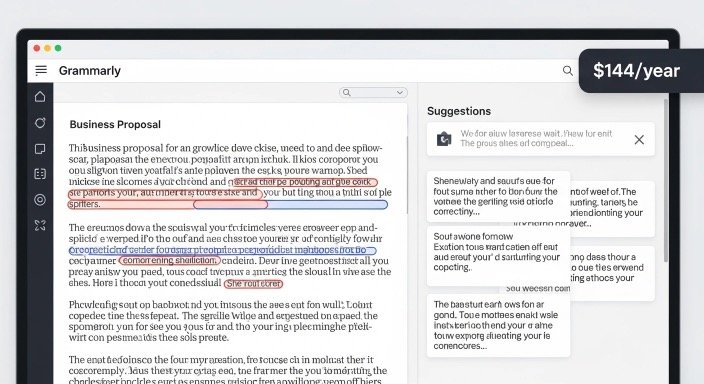
You’ve been using Grammarly’s free version and wondering whether upgrading to Premium (now called Grammarly Pro) actually makes a meaningful difference. Or maybe you’re already paying $144/year and questioning whether it’s still worth renewing.
Either way, this is a fair question. $144 per year isn’t pocket change—especially when the free version already catches typos and basic errors reasonably well.
This review cuts through the marketing language and tests Grammarly Pro against real writing scenarios to give you an honest answer. Not whether Grammarly is a useful tool in general—it clearly is—but whether the jump from free to $144/year delivers enough value to justify the cost for your specific situation.
The short answer: it depends entirely on how and how much you write. Let’s break that down.
Important Pricing Update: Grammarly Premium Is Now Grammarly Pro
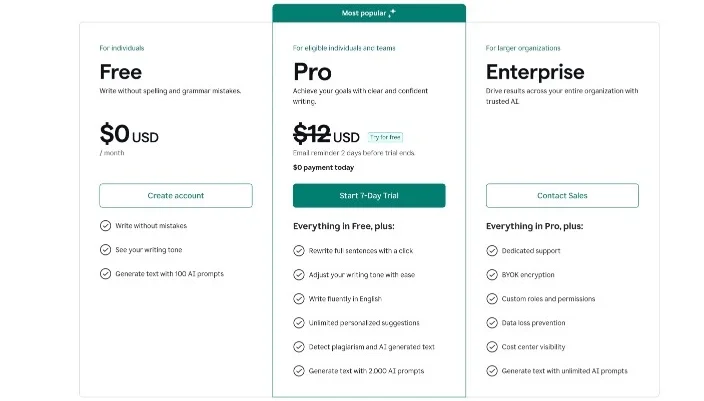
Before diving in, one important clarification about the headline. Grammarly recently rebranded its Premium plan to “Grammarly Pro.” The features remain essentially the same, the price remains the same, but the name changed.
According to Grammarly’s official support documentation, existing Premium subscribers are being transitioned to Pro plans gradually, with no change in pricing or features. New subscribers sign up directly for Pro.
So when this article references “Grammarly Premium” or “Grammarly Pro”—they’re the same thing. The $144/year figure in this headline remains accurate.
If you’re still exploring which AI writing tools are worth paying for, our honest breakdown of Copy.ai vs. Jasper 2026 shows how Grammarly compares to dedicated writing platforms.
Who This Review Helps (And Who It Doesn’t)
This review is for you if:
- You use Grammarly Free and wonder if upgrading makes a real difference
- You’re paying $144/year and questioning renewal value
- You write regularly for work, school, freelance projects, or professional communication
- You want an honest assessment beyond Grammarly’s own marketing
This probably isn’t what you need if:
- You write only occasionally (a few emails per week)
- You’re looking for a tool to write content from scratch
- You need advanced SEO writing tools specifically
- You already have professional editors reviewing your work
Current Grammarly Pricing (Is Grammarly Premium Worth It)
Grammarly Pro offers three billing options for individual users:
- Monthly: $30/month ($360/year)
- Quarterly: $20/month ($60 per quarter, $240/year)
- Annual: $12/month ($144/year) — the plan most people reference
The annual plan represents a 60% discount compared to monthly billing. For most users, the annual plan makes sense if you’re confident you’ll use Grammarly consistently throughout the year.
Free Plan remains available with basic grammar, spelling, and limited writing suggestions—no cost, no credit card required.
Enterprise Plan for larger organizations uses custom pricing through Grammarly’s sales team.
One thing worth noting: Grammarly doesn’t offer refunds on Pro subscriptions. You can cancel anytime to stop future billing, but you keep access until your current billing period ends—and you won’t receive money back for unused time.
What You Actually Get for $144/Year
The core question isn’t what features Grammarly lists—it’s which features genuinely improve your writing in daily use. Here’s an honest breakdown.
Advanced Grammar and Clarity Suggestions
What it does: Flags complex grammar issues, unclear sentence structures, and confusing phrasing that the free version misses entirely.
Real-world impact: In testing, Pro catches approximately 3-4x more issues than Free in longer documents. For emails and short messages, the gap narrows considerably—Free handles most basic errors adequately.
Who benefits most: Anyone writing long-form content—reports, proposals, essays, articles, blog posts. For short writing, the difference is less dramatic.
Full-Sentence Rewrites
What it does: Suggests complete rewrites of awkward or unclear sentences, not just word-level fixes.
Real-world impact: This is one of Pro’s most genuinely useful features. When you’ve written a sentence that technically works but reads awkwardly, Grammarly Pro offers alternative phrasing you can accept with one click.
Limitation: Suggestions sometimes alter meaning slightly. Always read rewrites carefully before accepting—don’t auto-accept everything.
Tone Detection and Adjustments
What it does: Analyzes your writing’s overall tone (confident, formal, friendly, concerned) and suggests adjustments based on your intended audience.
Real-world impact: Genuinely useful for professional emails where the wrong tone can create misunderstandings. Less useful for creative writing where tone is intentional.
Limitation: Tone suggestions occasionally feel overly conservative, flagging direct language as “too blunt” when directness is appropriate and intentional.
Plagiarism Checker
What it does: Compares your writing against a database of web content, academic papers, and publications, flagging potential matches.
Real-world impact: Essential for students, academics, and anyone publishing content where originality matters. For business professionals writing internal documents, this feature likely adds minimal value.
Limitation: Doesn’t check against all academic databases. Students at institutions with access to Turnitin or similar tools may find those more comprehensive for academic purposes.
Vocabulary Enhancement
What it does: Suggests stronger, more precise word choices when your current phrasing is vague, repetitive, or weak.
Real-world impact: Helpful for anyone whose writing tends toward repetitive vocabulary. Particularly useful for non-native English speakers looking to diversify word choice.
Limitation: Suggestions occasionally favor sophisticated vocabulary when simpler language communicates more clearly. Good writing isn’t always complex writing.
2,000 Monthly AI Prompts (GrammarlyGo)
What it does: Allows you to request AI-powered rewrites, drafts, and content suggestions directly within Grammarly’s interface.
Real-world impact: The jump from 100 prompts (Free) to 2,000 prompts (Pro) is substantial. For writers using Grammarly’s AI assistance regularly, Free plan users hit limits quickly.
Limitation: For context, 2,000 prompts sounds like a lot—and for most users, it is. Heavy users doing extensive content creation may still find limits restrictive during busy periods.
Citation Assistance
What it does: Formats and generates citations in MLA, APA, and Chicago styles.
Real-world impact: Valuable for students and academic writers. Minimal value for most business or professional writers.
Grammarly Free vs. Pro: Feature Comparison
| Feature | Free | Pro ($144/yr) |
|---|---|---|
| Basic grammar & spelling | ✅ | ✅ |
| Basic punctuation | ✅ | ✅ |
| Tone detection (basic) | ✅ | ✅ |
| Browser & desktop extension | ✅ | ✅ |
| AI prompts per month | 100 | 2,000 |
| Advanced grammar suggestions | ❌ | ✅ |
| Full-sentence rewrites | ❌ | ✅ |
| Tone adjustments | ❌ | ✅ |
| Plagiarism checker | ❌ | ✅ |
| Vocabulary enhancement | ❌ | ✅ |
| Citation assistance | ❌ | ✅ |
| Clarity & fluency improvements | Limited | ✅ Full access |
| Word choice suggestions | Limited | ✅ Full access |
Real User Test: Four Writing Scenarios
Theory matters less than performance in actual use. Here’s how Grammarly Pro performs across four common writing scenarios.
Test 1: Professional Email (300 words)
Free version findings: Caught basic spelling errors, flagged one comma splice, suggested minor punctuation fixes.
Pro version additions: Identified a sentence that could read as passive-aggressive and suggested a more collaborative reframe. Flagged three instances of vague language (“some issues,” “a few problems”) and suggested more specific alternatives. Noted the email’s tone skewed slightly tense and offered warmer phrasing for two sentences.
Verdict: Pro adds meaningful value for important professional emails. For routine internal communication, Free handles the basics adequately.
Test 2: Blog Post / Long-Form Article (1,500 words)
Free version findings: Caught spelling and basic grammar, flagged several obvious issues.
Pro version additions: Identified eleven additional clarity issues Free missed. Suggested five full-sentence rewrites for awkward passages. Flagged three vocabulary repetitions and offered alternatives. Noted two paragraphs as overly complex and suggested simplifying.
Verdict: Pro delivers substantial additional value for long-form writing. The gap between Free and Pro widens significantly with longer, more complex documents.
Test 3: Academic Essay (800 words)
Free version findings: Basic corrections only.
Pro version additions: Vocabulary improvements for academic tone, clarity suggestions, full-sentence rewrites for three poorly structured arguments, and plagiarism check (found no issues in this case).
Verdict: For students, Pro’s plagiarism checker and academic tone suggestions alone may justify the cost—especially if the alternative is paying per-use plagiarism checking services.
Test 4: Short Social Media Captions (5 captions, 50-80 words each)
Free version findings: Caught one typo, flagged comma usage.
Pro version additions: Minor tone suggestions for two captions, one vocabulary swap.
Verdict: Pro adds minimal value for short-form social content. Free handles this use case adequately.
Who Gets Real Value from $144/Year

Based on testing and practical analysis, Grammarly Pro genuinely pays for itself in certain situations.
Strong Yes – Worth the cost:
- You write 2,000+ words weekly (blog posts, reports, articles, proposals)
- You’re a student needing plagiarism detection regularly
- You write professional communications where tone and clarity matter significantly
- You’re a non-native English speaker needing comprehensive writing support
- You write client-facing content where errors affect professional reputation
If you’re just getting started with AI-powered tools in general, our beginner’s guide to what AI productivity actually means explains how tools like Grammarly fit into a broader productivity workflow.
Weak Yes – Probably worth it:
- You write regularly but primarily shorter content
- You occasionally send important long-form communications
- You value peace of mind about writing quality
Honest No – Stick with Free:
- You write only occasional emails and short documents
- Your primary writing involves technical or specialized content Grammarly doesn’t understand well
- You already have professional editors reviewing important work
- Your budget is tight and writing volume is moderate
What Grammarly Pro Doesn’t Do Well
Honest reviews include limitations. Here’s where Pro falls short.
Doesn’t Understand Context or Intent
Grammarly analyses writing mechanically. It doesn’t know whether your casual, direct tone is intentional or careless. It can’t tell if you’re writing humor, sarcasm, or an informal piece deliberately breaking grammar rules.
Heavy-handed following of Grammarly’s suggestions can actually strip personality from writing that was working perfectly fine before. Use suggestions as input, not commands.
Struggles with Technical and Specialized Writing
Legal documents, medical writing, technical specifications, academic disciplines with their own style conventions—Grammarly often flags correct specialized language as errors or makes suggestions that don’t apply.
If your writing is highly specialized, Grammarly Pro’s value diminishes considerably.
Can Create Dependency Rather Than Improvement
Some users become reliant on Grammarly catching errors rather than developing stronger writing habits. If your goal is improving as a writer, deliberately writing without Grammarly and reviewing your patterns builds more durable skills than outsourcing all correction.
For a broader understanding of how AI writing tools work and where they genuinely help versus fall short, our guide on what AI is and how it actually works provides useful context.
Plagiarism Checker Has Coverage Gaps
Grammarly’s plagiarism database is extensive but not comprehensive. For academic writing where detection matters significantly, institutional tools often provide more complete coverage against academic databases.
What to Avoid When Using Grammarly Pro
Getting the most from $144/year requires using the tool thoughtfully.
Don’t auto-accept all suggestions. Read each one and evaluate whether it improves your specific sentence. Blind acceptance can homogenize your writing voice.
Don’t use Grammarly as a substitute for proofreading. No automated tool catches every error. Read your work independently, especially before important submissions.
Don’t upgrade if you write infrequently. Monthly billing ($30/month) rarely makes sense for occasional writers. If you genuinely only write a few documents monthly, Free covers most needs.
Don’t rely solely on tone suggestions for high-stakes communication. Grammarly helps, but for genuinely important professional or personal communications, human judgment about tone and relationship context matters more.
Grammarly Pro vs. Free: The $144 Math
Let’s run a simple value calculation.
If Grammarly Pro saves you 30 minutes per week through faster editing, cleaner first drafts, and fewer revision cycles, that’s 26 hours annually. At $15/hour value on your time—well below most professional rates—that’s $390 in time saved against $144 spent.
For a writer producing content professionally, the math gets easier. If Pro prevents even one significant professional mistake or client-facing error annually, the cost pays for itself.
For an occasional writer sending a few emails weekly, Free handles most situations adequately and $144 delivers minimal additional return.
The Verdict: Is Grammarly Premium Worth $144/Year?
Yes, if you write regularly and write for results.
For professionals, content creators, students, freelancers, and anyone whose writing directly affects career outcomes or audience relationships, Grammarly Pro at $144/year represents genuine value. The combination of advanced grammar, clarity suggestions, full-sentence rewrites, tone analysis, and plagiarism detection adds up to a meaningful improvement in writing quality—particularly for longer, more complex documents.
No, if you write occasionally or primarily short content.
The free version handles basic needs surprisingly well. If your writing consists mostly of short emails and social posts, paying $144/year for features you’ll rarely trigger doesn’t make economic sense.
Start with the free version first. Use it for two weeks and note every time you think “I wish this would catch more.” If you hit that moment frequently, Pro will satisfy that frustration. If Free feels adequate, it probably is.
The honest bottom line: Grammarly Pro isn’t a magical writing improvement tool—it’s a sophisticated editing assistant. Its value correlates directly with how much you write and how much writing quality affects your outcomes. Match the tool to your actual usage, and the $144 either clearly pays for itself or clearly isn’t necessary.
Frequently Asked Questions
Is Grammarly Premium the same as Grammarly Pro in 2026?
Yes. Grammarly renamed its Premium plan to Pro in 2025. The pricing remains the same ($12/month billed annually, $144/year), the core features are identical, and existing Premium subscribers were automatically transitioned to Pro accounts. For new subscribers, Pro is what you’ll sign up for directly.
Does Grammarly Pro work in Microsoft Word and Google Docs?
Yes. Grammarly Pro integrates with Microsoft Word (via desktop app), Google Docs, Gmail, Outlook, and most web-based editors through the browser extension. Coverage is comprehensive for most writing workflows, though some specialized platforms may have limited or no integration.
Is Grammarly Pro worth it for non-native English speakers?
Generally yes, more so than for native speakers. Non-native English writers typically benefit significantly from advanced grammar suggestions, tone guidance, and vocabulary enhancement—all of which are Pro-only features. For non-native speakers writing professionally in English, $144/year is usually well justified.
Can Grammarly Pro replace a professional proofreader or editor?
No. Grammarly Pro provides automated suggestions based on pattern recognition. A professional editor brings contextual understanding, audience knowledge, structural judgment, and stylistic expertise that no automated tool currently replicates. Grammarly Pro works best as a first-pass review tool, not a replacement for human editorial judgment on important writing.
How does Grammarly Pro compare to built-in spelling and grammar tools in Microsoft Word?
Grammarly Pro is meaningfully more comprehensive than Word’s built-in tools. Where Word catches obvious errors, Grammarly adds tone analysis, clarity improvements, vocabulary suggestions, plagiarism detection, and full-sentence rewrites. For professional writing quality, Grammarly Pro offers a substantial upgrade over Word’s native corrections.
Our Authority Sources
Grammarly Official Pricing Page – Direct pricing information from Grammarly, confirming the current Pro plan structure and transition from Premium branding.
Grammarly Support Documentation – Pro Pricing – Official support documentation confirming pricing details, billing options, and the Premium-to-Pro transition for existing subscribers.
Grammarly Pro Official Page – Official product page detailing Pro features, team capabilities, and how Pro differs from the previous Premium plan.
DemandSage – Grammarly Pro Pricing 2026 – Third-party pricing analysis providing additional context on plan structures, discount opportunities, and feature comparisons with verified information.