

If you’re freelancing in 2026, you’ve probably noticed that your expenses can quietly eat into your income. Software subscriptions, outsourcing small tasks, tools for design, invoicing, communication — it adds up fast. The good news is that the right AI tools for freelancers don’t just save time, they genuinely save money by replacing expensive services, automating repetitive work, and helping you deliver better results without hiring help.
This isn’t a list of every AI tool that exists. It’s a practical guide to the ones that actually make a financial difference for freelancers working across design, writing, development, marketing, and business management. If you’re just getting started with AI tools generally, our beginner’s guide to AI productivity tools is a great place to build your foundation before diving in here.
Who This Is For / Who This Is NOT For
This guide is for you if:
- You’re a freelancer or solopreneur trying to reduce overhead
- You’re currently paying for multiple tools that could be consolidated
- You want to work faster without sacrificing quality
- You’re open to trying new tools but need honest assessments before committing
This is NOT for you if:
- You’re looking for a magic solution that replaces skill and expertise
- You expect free tools to match enterprise-level performance in every case
- You’re unwilling to invest a small learning curve to gain long-term savings
Why AI Tools Are a Game-Changer for Freelancer Budgets
The average freelancer spends anywhere between $200 and $500 per month on software and tools according to surveys from platforms like Freelancer.com and industry reports. That’s money coming directly out of your profit margin.
AI tools have quietly disrupted this by bundling capabilities that previously required separate subscriptions. A single AI design tool can now replace a stock photo subscription, a basic graphic designer, and a background removal service simultaneously. A good AI productivity tool can replace a virtual assistant for scheduling, email drafting, and research tasks.
The key is knowing which tools are genuinely worth it and which are just hype. Every tool on this list was selected based on three criteria: measurable time savings, direct cost replacement of more expensive alternatives, and realistic usability for solo freelancers without technical backgrounds.
The 15 Best AI Tools for Freelancers That Actually Save Money
1. Canva AI (Design & Visuals)
Replaces: Adobe Creative Cloud, stock photo subscriptions, freelance designer fees
Canva has evolved far beyond a simple drag-and-drop tool. Its AI features now include Magic Design, which generates complete layouts from a text prompt, and Magic Media, which creates images and videos from descriptions. For freelancers who need professional visuals but aren’t designers, this alone can save $50–$100 per month compared to maintaining an Adobe subscription or buying stock photos regularly.
Cost: Free tier available; Pro at $15/month Honest limitation: It won’t replace a professional designer for complex branding work, but for social media, presentations, and client reports it’s more than sufficient.
2. Notion AI (Project & Knowledge Management)
Notion AI integrates directly into your workspace to summarize notes, draft project briefs, generate action items from meetings, and answer questions based on your saved documents. For freelancers managing multiple clients, this consolidates tools that might otherwise cost $30–$60 per month combined. If you’re weighing Notion AI against other AI assistants, our detailed Notion AI vs ChatGPT comparison breaks down exactly which one suits different working styles.
Cost: Full AI access requires the Business plan at $20/month. The free and Plus tiers only include a limited trial of AI features — once you hit that limit, you’ll need to upgrade to get consistent value. If you’re already paying for a separate AI assistant elsewhere, the Business plan effectively replaces that cost while giving you a full workspace tool at the same time.
Honest limitation: The pricing change in May 2025 removed the old $10/month AI add-on option. This makes Notion a slightly bigger investment than it used to be for solo freelancers. It’s genuinely worth it if you live inside Notion daily — but if you’re only using it occasionally, the cost-to-value ratio drops. Start with the free tier to test whether it fits your workflow before committing.
3. Otter.ai (Meeting Transcription)
Replaces: Manual note-taking, transcription services, meeting recap emails
If you spend time on client calls, Otter.ai automatically transcribes, summarizes, and pulls out action items. Professional transcription services charge $1–$3 per minute. Even one hour of calls per week could save you $200+ monthly.
Cost: Free tier (300 minutes/month); Pro at $16.99/month Honest limitation: Accuracy drops with heavy accents or poor audio quality.
4. Descript (Audio & Video Editing)
Replaces: Video editors, podcast editors, and separate transcription tools
Descript lets you edit audio and video by editing text — delete a word in the transcript and it removes it from the recording. For freelancers who deliver video content, tutorials, or podcasts to clients, this replaces both a transcription service and a basic video editor. Hiring a freelance video editor for simple edits typically costs $25–$75 per hour.
Cost: Free tier available; Creator plan at $24/month Honest limitation: Not ideal for complex multi-track video productions.
5. Pictory (Video Creation from Text)
Replaces: Video production services, stock video subscriptions
Pictory converts blog posts or scripts into short videos automatically. For freelancers offering content marketing services, this lets you add video deliverables to packages without hiring a videographer or paying for expensive production tools.
Cost: Starts at $25/month Honest limitation: Output quality is good for social media but not broadcast-level production.
6. Fireflies.ai (Meeting Intelligence)
Replaces: Note-taking services, meeting summary tools, CRM manual entry
While Otter.ai focuses on transcription, Fireflies.ai goes further by integrating directly with your CRM, Slack, and project management tools. It captures meetings, creates summaries, and automatically logs client interaction notes. For freelancers managing several active client relationships, this eliminates hours of admin work weekly.
Cost: Free tier available; Pro at $18/month per seat Honest limitation: The free tier limits storage to 800 minutes, which fills up quickly if you’re in calls daily.
7. FreshBooks with AI Features (Invoicing & Accounting)
Replaces: Accountant fees for basic bookkeeping, separate invoicing tools, expense tracking apps
FreshBooks has integrated AI-powered expense categorization, invoice automation, and financial reporting. For freelancers, this means you can skip hiring a bookkeeper for routine tasks. Basic bookkeeping services typically cost $200–$400 per month — FreshBooks handles the fundamentals at a fraction of that cost.
Cost: Starts at $19/month Honest limitation: For complex tax situations or business structures, you’ll still need a human accountant. Think of it as handling the day-to-day so your accountant only handles the high-level work.
8. Grammarly (Writing & Communication)
Replaces: Proofreading services, writing coaches for professional communication, basic copyediting
Every freelancer writes — proposals, emails, reports, client updates. Grammarly’s AI now goes beyond grammar checking to suggest tone adjustments, restructure sentences for clarity, and adapt your writing style for different audiences. A single freelance proofreader charges $25–$50 per hour. If you’re sending polished proposals and reports daily, Grammarly pays for itself quickly. Before committing to the paid plan, check out our in-depth Grammarly Premium review to see whether the upgrade is genuinely worth it for your specific use case.
Cost: Free tier available; Pro at $30/month Honest limitation: It can occasionally over-suggest changes that alter your intended voice. Always review recommendations rather than accepting all of them.
9. Tidio (Client Communication & Chatbots)
Replaces: Customer support VA, basic live chat tools, inquiry response services
If you have a portfolio website or service page, Tidio lets you set up an AI chatbot that answers common client questions, qualifies leads, and collects contact information — even when you’re not available. This is particularly valuable for freelancers who lose potential clients by responding too slowly to inquiries.
Cost: Free tier available; Starter at $29/month Honest limitation: Requires initial setup time to train the bot properly. Generic out-of-the-box responses won’t impress potential clients.
10. Surfer SEO (Search Optimization)
Replaces: SEO consultants for content optimization, separate keyword research tools
For freelancers offering content writing or digital marketing services, Surfer SEO analyzes top-ranking pages and gives you a real-time content score as you write. It tells you exactly which keywords to include, ideal word count, and heading structure. Hiring an SEO consultant for content briefs can cost $50–$150 per piece — Surfer automates that process.
Cost: Essential plan at $99/month — worth it if you’re delivering SEO content regularly Honest limitation: Expensive for freelancers who only occasionally write SEO content. Better suited if content optimization is a core part of your service offering.
11. DoNotPay (Legal & Admin)
Replaces: Basic legal consultations, contract dispute assistance, subscription cancellation services
DoNotPay uses AI to help you fight unfair charges, cancel unwanted subscriptions, send legal demand letters, and navigate bureaucratic processes. For freelancers dealing with late-paying clients or contract disputes, having a tool that generates professional legal letters without hiring an attorney is genuinely useful.
Cost: $36/year Honest limitation: Not a replacement for a real attorney in serious legal situations. Best for small disputes and administrative tasks.
12. Loom (Async Video Communication)
Replaces: Lengthy email chains, live meetings, screen-share session tools
Loom’s AI features now automatically generate titles, summaries, and chapters for your recorded videos. For freelancers delivering work to clients, sending a short Loom walkthrough instead of writing a 500-word email saves significant time and reduces back-and-forth confusion. It also positions you as more professional and communicative, which directly impacts client retention.
Cost: Free tier available (25 videos); Business at $15/month per user Honest limitation: Some clients prefer written documentation over video, so gauge your audience before making it your default communication method.
13. Zapier with AI (Workflow Automation)
Replaces: Virtual assistants for repetitive tasks, manual data entry, multi-platform admin work
Zapier connects your tools and automates workflows between them. Its AI features now let you describe a workflow in plain English and it builds the automation for you. For example: automatically sending a welcome email when a new client fills out your contact form, logging new invoices in a spreadsheet, or posting project updates to Slack. Each automated workflow can save 30 minutes to several hours per week. For a deeper look at how AI automation works across your entire business, our guide to AI tools for business automation covers the broader picture beyond just Zapier.
Cost: Free tier available; Professional starts at $49/month Honest limitation: Complex multi-step automations can be tricky to set up without some technical patience. Start with simple two-step workflows before building complex ones.
14. Runway ML (Advanced Visual Content)
Replaces: Motion graphics designers, video effects freelancers, stock video purchases
Runway ML offers AI-powered video generation, background removal, and motion tracking. For freelancers in the creative space — social media managers, content creators, marketers — it opens up video capabilities that previously required expensive software and specialized skills. A single motion graphics project outsourced to a freelancer can cost $100–$500. Runway puts that capability in your hands.
Cost: Standard plan at $15/month Honest limitation: Generating high-quality video still requires some experimentation and creative direction. The tool amplifies your creativity but doesn’t replace it entirely.
15. Xero with AI Features (Financial Management)
Replaces: Separate invoicing, payroll tools, and basic financial reporting services
Xero is particularly strong for freelancers who work with international clients in multiple currencies. Its AI features automate bank reconciliation, predict cash flow, and categorize expenses with impressive accuracy over time. As your freelance business grows, Xero scales with you in a way that simpler tools don’t.
Cost: Early plan at $20/month Honest limitation: Slightly overkill for freelancers with very simple finances. FreshBooks (tool #7) may be a better starting point if you’re just getting started.
How to Choose the Right AI Tools Without Overspending
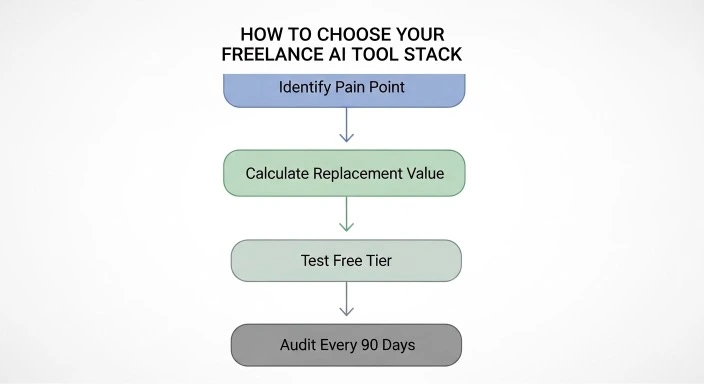
The biggest mistake freelancers make is subscribing to too many tools at once. Here’s a simple framework to avoid that trap:
Start with your biggest pain point. Where are you losing the most time or money right now? If it’s client communication, start with Loom or Fireflies. If it’s design, start with Canva AI. Solve one problem well before adding more tools. Our guide on how to organize your life with AI tools can help you map out where AI fits best across both your work and personal workflow.
Calculate the replacement value. For each tool you consider, ask: what am I currently paying for — or spending time on — that this replaces? If Canva Pro at $15/month replaces a $50 stock photo subscription plus two hours of design work monthly, the math is clear.
Use free tiers strategically. Most tools on this list offer free tiers. Spend 2–3 weeks genuinely testing a tool before paying for it. If you haven’t used it enough to hit the free tier limits, you probably don’t need the paid version yet.
Audit every 90 days. Set a calendar reminder to review your active subscriptions quarterly. Cancel anything you haven’t used consistently and reinvest that money into tools that are delivering real value.
Real Cost Savings: What This Looks Like in Practice
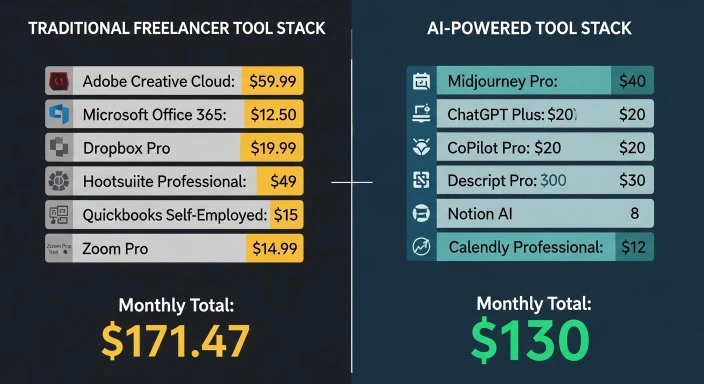
Let’s put real numbers to this. Here’s a typical freelancer’s monthly tool stack before and after switching to AI-powered alternatives:
Before AI Tools:
- Adobe Creative Cloud: $55/month
- Stock photo subscription: $50/month
- Transcription service: $80/month
- Freelance video editor (4 hours): $200/month
- Basic bookkeeper: $300/month
- Separate project management tools: $40/month
- Total: $725/month
After AI Tools (updated February 2026 pricing):
- Canva Pro: $15/month
- Otter.ai Pro: $8.33/month (billed annually)
- Descript Creator: $24/month
- FreshBooks: $19/month
- Notion Business (with AI): $20/month
- Zapier Professional: $49/month
- Total: $135.33/month
Monthly saving: ~$590 Annual saving: ~$7,080
Note: Notion’s pricing increased in May 2025 when full AI access was moved exclusively to the Business plan at $20/month. The savings calculation above reflects this updated cost. Despite the increase, the overall stack still delivers substantial savings compared to traditional tools.
A Note on Free vs. Paid Tiers
Several tools on this list have genuinely useful free tiers — Canva, Otter.ai, Loom, Tidio, and Zapier among them. If you’re just starting out or testing the waters, you can realistically build a functional AI-powered workflow spending $0 to $30 per month initially.
As your freelance income grows, upgrading to paid tiers unlocks features that multiply your productivity further. Think of it as a tiered investment — start lean, upgrade strategically based on what’s actually generating revenue for you.
Frequently Asked Questions
Q: Are AI tools reliable enough to use with paying clients? Yes, for most practical freelance tasks. Tools like Grammarly, Canva, FreshBooks, and Loom are used by millions of professionals daily. The key is always reviewing AI outputs before delivering them to clients. Use these tools to accelerate your work, not to replace your judgment.
Q: Will using AI tools make my work look generic or low quality? Only if you use them passively. AI tools work best when you apply your own expertise, creative direction, and personal touch on top of what they generate. A great freelancer using Canva AI still produces better work than a poor one because the skill lies in knowing what good looks like.
Q: How many of these tools do I actually need? Realistically, 3 to 5 well-chosen tools will cover most freelancers’ needs. Start with the areas where you’re losing the most time or money and build from there. Subscribing to all 15 simultaneously would actually defeat the purpose of saving money.
Q: Are these tools secure enough for client data? Most enterprise-grade tools on this list — including Notion, FreshBooks, and Xero — comply with GDPR and standard data protection requirements. That said, always review the privacy policy of any tool before uploading sensitive client information, and check whether your client contracts have any restrictions on third-party data processing.
Q: What if a tool I invest in shuts down or changes its pricing? This is a real risk with any SaaS product. Mitigate it by never building your entire workflow around a single tool, keeping exports of your important data regularly, and monitoring pricing changes. Tools like Canva, Notion, and Zapier are well-established enough that sudden shutdowns are unlikely, but smaller tools carry more risk.
The Bottom Line
The best AI tools for freelancers aren’t the ones with the most features — they’re the ones that solve your specific problems at a price that makes financial sense for your business. Whether you’re a designer, writer, developer, or consultant, there’s a combination of tools on this list that can meaningfully reduce your monthly expenses while improving the quality and speed of your work.
If you want to go even deeper, our guide on the best AI tools for freelancers that save hours covers the time-saving angle in detail — a perfect companion read to this article.
Start small. Pick one or two tools that address your biggest pain points right now. Test them seriously for a month. Then evaluate whether the time saved and costs replaced justify the subscription. That disciplined approach will serve you far better than chasing every new AI tool that launches.
Your freelance business deserves the same smart investment decisions you’d recommend to any of your clients.
Our Authority Sources
1. Freelancer.com Industry Report One of the most comprehensive annual surveys of freelancer income, expenses, and tool usage patterns. Used to validate average monthly software spending figures referenced in this article. freelancer.com
2. Zapier’s State of Business Automation Report Zapier publishes detailed annual research on how small businesses and solopreneurs use automation tools. Highly credible source for workflow automation data and trends. zapier.com
3. Statista Freelance Economy Data Statista aggregates verified market research on the global freelance economy, including growth trends and income statistics used to contextualize this guide. statista.com
4. G2 Software Reviews G2 is one of the most trusted independent software review platforms, used here to cross-reference user satisfaction ratings and real-world use cases for the tools featured. g2.com
5. TechRadar Pro TechRadar’s professional technology coverage provided up-to-date pricing and feature verification for several tools in this article. techradar.com