

If you’ve opened ChatGPT and stared at a blank prompt box wondering what to type, you’re not alone. ChatGPT prompts for productivity are pre-written instructions that help you use ChatGPT to automate tasks, make decisions faster, and streamline your workflow—but most people waste time recreating them from scratch every single day.
This guide provides 50+ ready-to-use productivity prompts organized by professional use case, plus a downloadable template and video tutorial showing exactly how to customize them for your specific work. No fluff, no generic advice—just prompts that actually save time.
Table of Contents
- Who This Is For / Who This Is NOT For
- Why Most Productivity Prompts Fail
- How to Use These Prompts Effectively
- Planning & Strategy Prompts (7 Prompts)
- Email & Communication Prompts (8 Prompts)
- Meeting & Collaboration Prompts (6 Prompts)
- Decision-Making Prompts (5 Prompts)
- Learning & Research Prompts (7 Prompts)
- Content Creation Prompts (8 Prompts)
- Time Management Prompts (6 Prompts)
- Problem-Solving Prompts (5 Prompts)
- Customizing Prompts for Your Workflow
- Common Mistakes to Avoid
- FAQ
Who This Is For / Who This Is NOT For
This guide is for you if:
- You use ChatGPT regularly but feel like you’re reinventing the wheel with every prompt
- You’re a professional, entrepreneur, or knowledge worker managing multiple projects
- You want to integrate ChatGPT into your actual workflow, not just experiment with it
- You’re looking for tested prompts that work with ChatGPT’s current capabilities (as of February 2026, including GPT-5.2 features)
This is NOT for you if:
- You’re looking for creative writing prompts or entertainment uses
- You need highly technical coding prompts (this focuses on general productivity)
- You want “magic bullet” solutions that require no customization
- You’re brand new to ChatGPT and need basic introductory guidance first
If you’re just getting started with AI productivity tools, our beginner’s guide to AI productivity tools provides essential foundation before diving into advanced prompt engineering.
Why Most Productivity Prompts Fail (And How These Are Different)
Here’s the uncomfortable truth: most “productivity prompt” articles give you generic templates that sound impressive but produce mediocre results in real work scenarios.
The three reasons most prompts fail:
- They’re too vague. “Help me be more productive” tells ChatGPT nothing about your actual context, constraints, or goals.
- They’re not customizable. Copy-paste prompts work once, then become obsolete as your needs change.
- They ignore ChatGPT’s actual capabilities. Many prompts were written for older models and don’t leverage GPT-5.2’s improved response style and quality, which outputs clearer, more relevant answers to advice-seeking and how-to questions, more reliably placing the most important info upfront.
The prompts in this guide solve these problems by:
- Including specific context variables you fill in
- Explaining WHY each prompt works
- Being designed for ChatGPT’s current February 2026 capabilities
For readers interested in how different AI assistants compare for productivity work, our Notion AI vs ChatGPT comparison explores which tool excels at various productivity tasks.
How to Use These Prompts Effectively
Before diving into the prompts, understand this framework:
Step 1: Copy the base prompt
Each prompt below is a template with [bracketed variables].
Step 2: Fill in your context
Replace [bracketed sections] with your specific details. The more specific, the better your results.
Step 3: Review and refine
ChatGPT’s first response is rarely perfect. Use follow-up prompts like “Make this more concise” or “Focus specifically on X.”
Step 4: Save your best versions
With Projects now available on the Free tier with up to 5 file uploads, you can organize your best prompt variations by project or workflow type.
Pro tip: ChatGPT’s February 2026 updates include up to 20-file uploads and broader file type support, meaning you can attach relevant documents directly to your prompts for more contextualized responses.
Planning & Strategy Prompts
1. Weekly Planning Sprint
When to use: Every Monday morning or Sunday evening
Time saved: 30-45 minutes per week
Prompt:
I need to plan my week effectively. Here's my context:

Current projects: [List 2-4 active projects]
Key deadlines: [List what's due this week with dates]
Meetings scheduled: [Number of meetings and total hours]
Priority goal: [Your #1 objective for this week]

Create a realistic weekly plan that:
1. Time-blocks deep work for my priority goal
2. Identifies tasks I should delegate or postpone
3. Builds in buffer time for unexpected issues
4. Suggests 2-3 "quick wins" I can complete Monday/Tuesday

Format as a day-by-day breakdown.
Why this works: The prompt gives ChatGPT your actual constraints, not hypothetical ones. It asks for delegation opportunities and quick wins—tactical details most people forget.
Real example: A marketing manager used this prompt and discovered she was scheduling deep strategy work right after back-to-back client calls. The AI suggested moving strategy sessions to mornings and consolidating client calls into Tuesday/Thursday blocks.
2. Project Kickoff Framework
When to use: Starting any new project or initiative
Time saved: 1-2 hours of planning
Prompt:
I'm starting a new project and need a kickoff framework. Details:

Project: [Brief description]
Goal: [What success looks like]
Timeline: [Start and end dates]
Team size: [Number of people or "just me"]
Budget: [Amount or "constrained"]
Biggest risk: [What you're most worried about]

Create a project plan that includes:
- 5-7 key milestones with suggested dates
- Critical assumptions we need to validate first
- Who needs to be involved at which stages
- 3 early warning signs this project is going off track

Be realistic about timeline—I'd rather know now if this is ambitious.
Why this works: It forces you to articulate your biggest worry upfront, which helps ChatGPT provide more relevant risk mitigation.
3. Decision Documentation
When to use: After making any significant business or career decision
Purpose: Create a record for future reference
Prompt:
I just made a decision and want to document my reasoning. Context:

Decision: [What you decided]
Options considered: [What else you evaluated]
Key factors: [Top 3 things that influenced your choice]
Trade-offs accepted: [What you're giving up or risking]

Help me create a one-page decision document that includes:
- The decision and its rationale
- Key assumptions this decision relies on
- Success metrics (how we'll know this was right)
- Conditions that would make us reverse course
- Review date (when to reassess)

Write this as if I'm explaining to my future self 6 months from now.
Why this works: GPT-5.2’s more measured and grounded tone, more contextually appropriate to the conversation, makes it excellent for this type of reflective documentation.
4. Goal Breakdown (90-Day Focus)
Prompt:
I have a 90-day goal I need to break down into actionable steps:

Goal: [Your specific objective]
Current situation: [Where you are now]
Resources available: [Time/money/people/tools]
Biggest obstacle: [What's blocking progress]

Break this into:
- 3 monthly themes (one focus per month)
- Weekly milestones for Month 1
- Daily actions for Week 1
- Quick-start tasks I can do today

Flag anything that seems unrealistic given my resources.
5. Competitive Analysis Brief
Prompt:
I need to quickly analyze competitors for: [Your product/service/project]

Competitors: [List 2-4 direct competitors]
What I know: [Brief description of what they do]
What I need: [Specific insights you're looking for]

Provide:
- A comparison table highlighting key differences
- 2-3 things they're doing well that I could adapt
- 2-3 gaps or weaknesses I could exploit
- One unconventional strategy none of them are using

Focus on actionable intelligence, not just features.
6. Quarterly Review Structure
Prompt:
I'm conducting my quarterly review. Help me analyze:

Last quarter's wins: [2-4 things that went well]
What didn't work: [1-2 things that failed or stalled]
Key metrics: [Numbers/progress on main goals]
Energy level: [How I'm feeling about work right now]

Create a review that:
1. Identifies 2-3 patterns worth noting
2. Suggests what to double down on
3. Recommends what to stop or delegate
4. Proposes one focus area for next quarter

Be honest about what the data is really telling me.
7. “Should I Build This?” Evaluation
Prompt:
I have an idea and need objective evaluation:

Idea: [Brief description]
Why I'm excited: [What appeals to you]
Investment required: [Time/money/resources]
Alternative: [What you'd do instead]
Opportunity cost: [What you'd have to stop doing]

Give me:
- 3 reasons this is a good idea
- 3 reasons this might be a waste of time
- 2-3 validation tests I could run this week
- A clear "green light" or "pause and validate" recommendation

Challenge my enthusiasm—I need honest perspective.
Email & Communication Prompts
8. Professional Email Rewrite
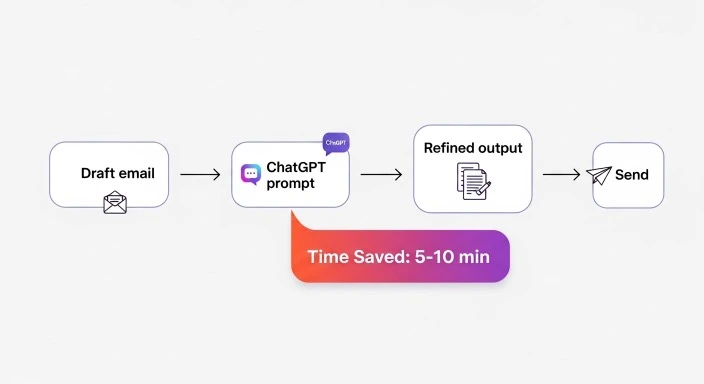
When to use: Before sending important emails
Time saved: 5-10 minutes per email
Prompt:
Rewrite this email to be more [professional/concise/persuasive]:

Original email: [Paste your draft]

Context:
- Recipient: [Their role/relationship to you]
- Goal: [What you want them to do]
- Tone needed: [Formal, friendly, urgent, etc.]
- Length: [Keep under X words/paragraphs]

Ensure the rewrite:
- Gets to the point in the first 2 sentences
- Includes a clear call-to-action
- Maintains my key points but improves clarity
- Removes unnecessary apologies or hedging
Why this works: Specifying the recipient’s role and your goal dramatically improves relevance. ChatGPT understands how to adjust tone and formality based on professional context.
9. Meeting Follow-Up Template
Prompt:
Create a meeting follow-up email based on these notes:

Meeting: [Topic]
Attendees: [Names/roles]
Key decisions: [What was decided]
Action items: [Who's doing what]
Open questions: [What's still unclear]

Format as an email that:
- Summarizes decisions clearly
- Lists action items with owners and due dates
- Flags anything that needs input before next meeting
- Sets expectations for next steps

Keep it under 200 words—people won't read longer follow-ups.
10. Difficult Conversation Framework
Prompt:
I need to have a difficult conversation and want to prepare:

Topic: [What needs to be addressed]
Relationship: [Your connection to this person]
Outcome I want: [What success looks like]
What makes this hard: [Why you're anxious about it]

Help me prepare by providing:
1. An opening statement that's direct but respectful
2. 3 key points I need to make
3. Anticipated objections and how to respond
4. A closing that maintains the relationship
5. What NOT to say (common mistakes)

Tone should be firm but empathetic.
11. Delegation Email
Prompt:
I need to delegate this task effectively:

Task: [What needs to be done]
To whom: [Person's name and role]
Why them: [Why you chose this person]
Deadline: [When it's needed]
Context: [Why this matters]

Draft an email that:
- Clearly describes the task and deliverable
- Explains the bigger picture (why it matters)
- Specifies success criteria
- Sets a clear deadline
- Empowers them to make decisions within boundaries
- Offers support without micromanaging

Avoid making this feel like busywork.
12. Client Status Update
Prompt:
Create a client status update for:

Project: [Name]
This week's progress: [What was completed]
Next week's plan: [What's coming up]
Blockers: [If any]
On track? [Yes/no and why]

Format as:
- Brief summary (2-3 sentences)
- Progress bullets (what's done)
- Next steps (what's coming)
- Any decisions needed from client

Keep it factual and forward-looking. Avoid jargon.
13. LinkedIn Connection Message
Prompt:
Write a LinkedIn connection request to:

Person: [Name and title]
Why I want to connect: [Genuine reason]
Common ground: [Mutual connection, shared interest, etc.]
What I offer: [Value you bring]

Keep it:
- Under 250 characters
- Personalized (not generic)
- Focused on mutual benefit
- Professional but warm

Avoid sales-y language or asking for anything in this initial message.
14. “No” Response (Declining Gracefully)
Prompt:
I need to decline this request professionally:

Request: [What they asked for]
From: [Relationship]
Why I'm saying no: [Real reason]
What I can offer instead: [If anything]

Draft a response that:
- Declines clearly (no ambiguity)
- Explains why without over-apologizing
- Offers an alternative if possible
- Maintains goodwill
- Doesn't leave door open if I genuinely can't help

Keep under 100 words.
15. Feedback Request Email
Prompt:
I need feedback on [project/work/proposal] from [person/team]:

What I need feedback on: [Specific areas]
Deadline: [When you need it]
Context: [Why their input matters]
Format preferred: [Written, call, etc.]

Create an email that:
- Makes giving feedback easy (specific questions)
- Shows you value their time
- Explains how you'll use their input
- Sets a clear deadline
- Includes 3-5 focused questions

Make it feel like you want honest input, not validation.
Meeting & Collaboration Prompts
16. Pre-Meeting Preparation Brief
When to use: 30 minutes before any important meeting
Time saved: 15-20 minutes of scattered prep
Prompt:
I have a meeting coming up and need to prepare:

Meeting: [Topic/title]
Attendees: [List key people and their roles]
Duration: [Length]
My role: [Leading, participating, presenting, etc.]
Goal: [What needs to be accomplished]
Background: [Relevant context]

Create a preparation brief that includes:
- 3 key questions I should be ready to answer
- 2-3 points I need to make
- Potential objections or concerns to anticipate
- One thing I should research before the meeting
- A 30-second opening statement

Keep this practical and action-focused.
Why this works: Forces you to clarify your role and goal before walking into the room. The 30-second opening statement is particularly valuable for establishing credibility early.
17. Meeting Agenda Generator
Prompt:
Create a focused meeting agenda for:

Topic: [What the meeting is about]
Duration: [How long you have]
Attendees: [Who's coming]
Decisions needed: [What must be decided]
Updates to share: [Information people need]

Format the agenda with:
- Time allocations for each item
- Who leads each section
- Expected outcome for each topic
- Parking lot for off-topic items
- Pre-work or prep attendees should do

Make sure total time leaves 5-minute buffer at end.
18. Post-Meeting Action Items
Prompt:
Turn these meeting notes into clear action items:

[Paste your meeting notes or voice-to-text transcript]

Extract:
- Action items with owner and deadline
- Decisions that were made
- Open questions that need answers
- Information that needs to be shared with non-attendees

Format as a simple checklist I can copy into our project management tool.
Real use case: With ChatGPT’s improved Voice responses and better search integration, you can now record meeting audio, get a transcript, and generate this summary in minutes.
19. Brainstorming Session Structure
Prompt:
I'm facilitating a brainstorming session on [topic]:

Participants: [Number and roles]
Time available: [Duration]
Goal: [What kind of ideas we need]
Constraints: [Budget, timeline, resources]

Design a session structure that:
1. Starts with divergent thinking (generating ideas)
2. Moves to convergent thinking (narrowing down)
3. Includes a method for prioritizing ideas
4. Ends with clear next steps

Include timing for each phase and facilitation tips.
20. Async Update Template
Prompt:
Create an async update format for my team:

Team: [Size and roles]
Frequency: [Daily/weekly]
Key info needed: [What people need to know]
Time available: [How long people have to read/respond]

Design a template that:
- Takes under 3 minutes to write
- Takes under 2 minutes to read
- Highlights blockers clearly
- Encourages brief responses
- Works in [Slack/email/project management tool]

Make it scannable with emojis or status indicators.
21. Retrospective Framework
Prompt:
Create a retrospective framework for:

Project/Sprint: [Name]
Duration: [How long it lasted]
Team size: [Number of people]
Goal achieved? [Yes/no/partially]

Structure a 45-minute retrospective that covers:
- What went well (to amplify)
- What didn't work (to fix)
- Surprises or lessons learned
- 2-3 action items for next time

Include specific questions for each section that get beyond surface-level responses.
Decision-Making Prompts
22. Pros & Cons Analysis (Enhanced)
When to use: Facing a decision with multiple viable options
Time saved: 30-60 minutes of mental spinning
Prompt:
I'm deciding between options and need structured analysis:

Decision: [What you're choosing between]
Option A: [First choice]
Option B: [Second choice]
Option C: [Third choice, if applicable]
Decision criteria: [What matters most - cost, time, quality, risk, etc.]
Deadline: [When you need to decide]

For each option, provide:
- 3 strongest pros
- 3 realistic cons
- Hidden costs or risks
- Best-case and worst-case scenarios
- Reversibility (can I undo this?)

Then recommend which option best fits my criteria and why.
Why this works: The “reversibility” question is often overlooked but crucial. Some decisions are expensive to reverse; others aren’t.
23. Second-Order Thinking Prompt
Prompt:
I'm considering [decision/action] and want to think beyond immediate consequences:

Immediate action: [What you're planning to do]
Immediate benefit: [Why it seems good now]
Timeline: [When you'd implement]

Help me think through:
- Second-order effects (what happens after the immediate result?)
- Who else this impacts (unintended stakeholders)
- Assumptions I'm making that might be wrong
- What success actually looks like 6-12 months out
- The "and then what?" chain of events

Challenge my reasoning—what am I not considering?
24. Decision Matrix Builder
Prompt:
Create a decision matrix for choosing between [X options]:

Options: [List all choices]
Criteria to evaluate: [List 4-6 factors that matter]
Weight of each criterion: [Which matters most? Scale 1-5]

Build a weighted decision matrix that:
- Scores each option on each criterion
- Applies the weights
- Shows total scores
- Highlights the winner
- Flags close calls that need more investigation

Format as a simple table I can share with stakeholders.
25. Risk Assessment Framework
Prompt:
Evaluate risks for this decision:

Decision: [What you're considering]
Potential upside: [Best outcome]
Resources at stake: [What you're investing]
Timeframe: [How long until you know if it worked]

Assess:
- Probability of failure (low/medium/high)
- Cost of failure (acceptable/painful/catastrophic)
- Early warning signs this is going wrong
- Exit strategy if you need to cut losses
- Mitigation tactics to reduce risk

Be realistic about what could go wrong.
26. Opportunity Cost Calculator
Prompt:
Help me understand the true cost of choosing [Option A]:

If I choose this: [Option A details]
I can't do: [What you'd give up]
Time investment: [Hours/weeks required]
Money investment: [Budget needed]

Calculate opportunity cost by showing:
- What I'm saying "no" to by saying "yes" to this
- ROI comparison if I invested time/money elsewhere
- Whether this is worth the trade-off given my [current goals/situation]

Give me the math and a recommendation.
Learning & Research Prompts
27. Learn Anything (30-Minute Framework)
When to use: Need to quickly understand a new topic
Time saved: Hours of scattered research
Prompt:
I need to learn the essentials of [topic] quickly:

Topic: [What you need to understand]
Why I need this: [Context/application]
Current knowledge: [What you already know]
Time available: [How long you can spend]
Goal: [What you need to be able to do]

Create a 30-minute learning plan that:
1. Starts with the core concept (explain like I'm smart but new)
2. Covers the 20% that explains 80% of the topic
3. Includes 2-3 concrete examples
4. Flags common misconceptions
5. Provides 3 resources for going deeper

Skip history and background—focus on practical understanding.
Why this works: For professionals who need to learn across domains, this works with ChatGPT’s February 2026 capabilities where GPT-5 is smarter across the board, providing more useful responses across math, science, finance, law, and more.
28. Explain It to Me Differently
Prompt:
I'm struggling to understand [concept].

What's confusing me: [Specific part you don't get]
What I've already tried: [Resources/explanations you've seen]
My background: [Relevant knowledge you have]

Explain this to me using:
- A simple analogy I can relate to
- A real-world example from [your industry/interest]
- A visual description (as if drawing a diagram)
- The key insight in one sentence

Then test my understanding with a question.
29. Research Summary Generator
Prompt:
I need to research [topic] for [purpose]:

Question I'm answering: [What you need to know]
Context: [Why this matters]
Audience: [Who will see this]
Depth needed: [Surface level / moderate / deep]

Provide a research summary that includes:
- Key findings (5-7 main points)
- Conflicting viewpoints (if relevant)
- Data or statistics that matter
- Gaps in current knowledge
- 3-5 authoritative sources to cite

Format for quick scanning.
Note: While ChatGPT can provide research frameworks, always verify information against authoritative sources. According to OpenAI’s documentation, GPT-5 is more reliable and less prone to hallucinations, but citation verification remains essential.
30. Skill Development Roadmap
Prompt:
I want to develop [skill] for [purpose]:

Skill: [What you want to learn]
Current level: [Beginner/intermediate/advanced in related areas]
Time available: [Hours per week]
Timeframe: [How soon you need this]
Application: [How you'll use it]

Create a learning roadmap with:
- Milestones for months 1, 2, and 3
- Specific resources or courses to use
- Practice projects to build competence
- How to measure progress
- Common pitfalls to avoid

Focus on practical application, not theory.
31. Industry Trends Brief
Prompt:
Summarize current trends in [industry] relevant to my role:

Industry: [Your sector]
My role: [What you do]
Focus area: [Specific aspect you care about]
Timeframe: [What's happening now vs. next 6-12 months]

Provide:
- 3-5 trends actually impacting day-to-day work
- Which are hype vs. which have staying power
- How these might affect [your specific situation]
- One action I should take based on these trends

Skip buzzwords—focus on practical implications.
32. Book Summary (Actionable)
Prompt:
I want the key insights from [book title] by [author]:

Book: [Title and author]
Why I'm reading: [What problem you're trying to solve]
Context: [Your situation]

Provide:
- The book's main thesis (one paragraph)
- 5 most actionable insights
- Which ideas apply to my situation
- One thing I can implement this week
- Whether I should read the full book or if this summary is enough

Focus on application, not book report details.
33. Concept Comparison
Prompt:
Explain the difference between [Concept A] and [Concept B]:

Concept A: [First term]
Concept B: [Second term]
Why I'm confused: [What's unclear]
How I plan to use this: [Context]

Provide:
- Clear definition of each
- Key differences in a comparison table
- When to use each one
- Common mistakes in mixing them up
- Example showing both in action

Make this crystal clear—I keep confusing these.
Content Creation Prompts
34. Blog Post Outline Generator
When to use: Starting any written content
Time saved: 30-45 minutes of outlining
Prompt:
Create a blog post outline for:

Topic: [What you're writing about]
Target reader: [Who needs this information]
Goal: [What you want readers to do/know/feel]
Keyword: [SEO focus, if applicable]
Length: [Target word count]

Provide an outline with:
- Compelling headline options (3 variations)
- Opening hook that addresses reader's pain
- 5-7 main sections with H2 headings
- 2-3 bullet points under each section
- A clear call-to-action
- SEO considerations

Focus on reader value, not keyword stuffing.
Real application: This works particularly well with the new capabilities in February 2026, as ChatGPT can now handle longer, more complex document planning.
35. Social Media Content Calendar
Prompt:
Create a week of social media content for:

Platform: [Where you're posting]
Brand/business: [What you represent]
Audience: [Who follows you]
Content pillars: [3-4 themes you cover]
Posting frequency: [How often]
Goal: [Engagement, traffic, sales, etc.]

Generate:
- 7 post ideas mapped to specific days
- Post copy for each (platform-appropriate length)
- Content mix (promotional vs. educational vs. entertaining)
- Hashtag suggestions
- Best posting times

Make it authentic to [your/brand] voice, not generic marketing-speak.
36. Video Script Template
Prompt:
Write a video script for:

Video type: [Tutorial, explainer, vlog, etc.]
Length: [Target duration]
Topic: [What you're covering]
Audience: [Who's watching]
Platform: [YouTube, TikTok, LinkedIn, etc.]

Structure the script with:
- Hook (first 5 seconds that stops scrolling)
- Problem introduction
- Solution/teaching content
- Examples or demonstrations
- Call-to-action
- Timestamps for editing

Include cues for visuals, B-roll, or screen recordings.
37. Newsletter Content Framework
Prompt:
Plan a newsletter issue on [topic]:

Audience: [Your subscribers]
Topic: [This issue's focus]
Goals: [What you want to achieve]
Length: [Reading time target]
Frequency: [How often you send]

Structure as:
- Subject line options (5 variations testing different angles)
- Opening paragraph (compelling hook)
- 3-4 main content blocks
- Resource/link recommendations
- Personal commentary or insight
- Clear next step for readers

Tone should be [conversational/professional/educational].
38. Presentation Outline (Persuasive)
Prompt:
Create a presentation outline for:

Topic: [What you're presenting]
Audience: [Who's listening]
Time: [Duration]
Goal: [What decision/action you want]
Key message: [One thing they must remember]

Structure as:
- Opening (attention-grabbing start)
- Problem statement (why this matters)
- Solution overview
- Evidence/support (3-4 key points)
- Objections addressed
- Call to action
- Closing (memorable finish)

Include slide count estimate and timing for each section.
39. Case Study Structure
Prompt:
Turn this success story into a case study:

Client/Project: [Name or description]
Challenge: [Problem they faced]
Solution: [What you did]
Results: [Outcomes/metrics]
Timeline: [How long this took]

Format as a case study with:
- Compelling headline
- Client background (brief)
- Challenge explained (with stakes)
- Solution described (your approach)
- Results quantified (specific numbers)
- Client quote or testimonial
- Key takeaways

Make results concrete and measurable.
40. Copywriting Formula Application
Prompt:
Apply the [PAS/AIDA/BAB] copywriting formula to:

Product/Service: [What you're selling]
Target customer: [Who buys this]
Main benefit: [Primary value proposition]
Price: [Cost]
Objection: [Main reason people don't buy]

Write copy using [chosen formula] that:
- Addresses the specific pain point
- Presents your solution clearly
- Shows proof or credibility
- Handles the main objection
- Drives action with clear CTA

Keep under [word count] and maintain [tone].
41. Content Repurposing Plan
Prompt:
Help me repurpose this content across platforms:

Original content: [Blog post/video/podcast episode]
Main ideas: [Key points covered]
Available platforms: [Where you could post]
Time available: [For creating repurposed versions]

Create a repurposing plan showing how to turn this into:
- 3-5 social media posts
- Email newsletter section
- Short video/reel script
- LinkedIn article angle
- Quote graphics or carousel
- Podcast talking points

Focus on adapting the message, not just copy-pasting.
Time Management Prompts
42. Time Audit Analysis
When to use: When you feel busy but unproductive
Time saved: Identifies where hours are actually going
Prompt:
Analyze how I'm spending my time:

Typical week breakdown:
- Meetings: [Hours per week]
- Email/communication: [Hours]
- Deep work/projects: [Hours]
- Administrative tasks: [Hours]
- Other: [Specify]

Total work hours: [Your typical week]
Feeling: [Overwhelmed/underwhelmed/misaligned]

Analyze this and provide:
- Where my time doesn't match my priorities
- Tasks I should delegate, automate, or eliminate
- Suggested time reallocation
- One specific change to test this week

Be brutally honest about where I'm wasting time.
Why this works: Most people overestimate productive hours and underestimate time drains. This prompt forces honest accounting.
43. Deep Work Scheduling
Prompt:
Design a deep work schedule for me:

Priority project: [What needs focused time]
Available slots: [When you could work deeply]
Distractions: [What typically interrupts you]
Energy patterns: [When you're most alert]
Non-negotiable commitments: [Fixed meetings/obligations]

Create a weekly schedule that:
- Blocks 3-5 deep work sessions
- Places them during peak energy times
- Builds in transition buffers
- Protects these blocks from meetings
- Includes accountability measures

Make this realistic, not aspirational.
44. Task Prioritization (Eisenhower Matrix)
Prompt:
Help me prioritize this task list:

[Paste your to-do list or describe 8-10 current tasks]

Context:
- Current top goal: [What you're trying to achieve]
- Deadline pressure: [What's time-sensitive]
- Energy level: [How you're feeling]

Sort these into Eisenhower Matrix quadrants:
- Urgent & Important (do first)
- Important, not urgent (schedule)
- Urgent, not important (delegate)
- Neither (eliminate)

For each task, suggest:
- When to do it (specific day/time)
- How long it will take
- Whether someone else should handle it

Give me a clear priority order for today.
45. Productivity System Design
Prompt:
I need a simple productivity system for:

Work style: [How you prefer to work]
Tools I use: [Apps/platforms]
Complexity tolerance: [Simple/moderate/complex]
Pain points: [What's not working now]

Design a system that covers:
- How to capture tasks/ideas
- How to organize by project/priority
- Daily/weekly planning rituals
- Review cycles
- Integration with [your tools]

Keep it simple enough I'll actually use it.
46. Meeting Reduction Strategy
Prompt:
I'm in too many meetings. Help me reclaim time:

Current meetings: [Number per week]
Time in meetings: [Total hours]
Meetings I lead: [Number]
Meetings I attend: [Number]
Outcome: [Do meetings usually achieve goals?]

Provide strategies to:
- Decline meetings appropriately
- Make necessary meetings shorter
- Replace some with async updates
- Improve meeting ROI
- Suggested script for declining

Goal: Reduce meeting time by 30% without dropping important balls.
47. Energy Management Plan
Prompt:
Design an energy management system for:

Energy patterns: [When you have most/least energy]
Draining tasks: [What exhausts you]
Energizing tasks: [What recharges you]
Sleep schedule: [Your typical pattern]
Exercise: [Current routine]

Create a plan that:
- Schedules draining tasks during peak energy
- Builds in recovery time
- Alternates between different work types
- Protects evening/weekend boundaries
- Suggests sustainable practices

Focus on sustainability, not optimization.
Problem-Solving Prompts
48. Root Cause Analysis
When to use: When the same problem keeps recurring
Time saved: Gets to actual source instead of treating symptoms
Prompt:
Help me find the root cause of this recurring problem:

Problem: [What keeps happening]
Frequency: [How often]
Impact: [What it costs you]
Attempted solutions: [What you've tried]
Why those failed: [What happened]

Use "5 Whys" method to dig deeper:
- Ask "why" until we reach the root cause
- Identify systemic issues vs. symptoms
- Suggest solutions that address the actual root
- Prevent this from recurring

Don't let me blame external factors if the root is internal.
Why this works: The “5 Whys” technique reveals root causes instead of surface symptoms. ChatGPT excels at asking probing follow-up questions.
49. Constraint-Based Solution Finding
Prompt:
I need a creative solution within strict constraints:

Problem: [What you're trying to solve]
Constraints:
- Budget: [What you can spend]
- Time: [When it's needed]
- Resources: [What/who you have]
- Other limits: [Any other restrictions]

Generate 3 solution approaches that:
- Work within all constraints
- Don't require asking for more resources
- Use what I already have access to
- Are implementable starting today

Prioritize creative workarounds over ideal solutions.
50. Failure Analysis (Blameless)
Prompt:
Conduct a blameless post-mortem on this failure:

What failed: [Project/initiative/goal]
Original goal: [What you were trying to achieve]
What actually happened: [Outcome]
Contributing factors: [Everything that played a role]

Analyze objectively:
- What decisions led here
- What we couldn't have predicted
- What warning signs we missed
- What we'd do differently
- Specific changes for next time

Focus on learning, not blame. What can we control going forward?
51. Decision Tree Builder
Prompt:
Create a decision tree for this situation:

Decision point: [What you're facing]
Possible actions: [Your options]
Variables: [What factors might change]
Timeline: [When you'll know more]

Build a decision tree showing:
- Initial decision branches
- Likely outcomes of each path
- Subsequent decisions based on outcomes
- Best/worst case for each path
- When to pivot vs. commit

Help me plan moves ahead, not just the first choice.
52. Stakeholder Analysis
Prompt:
Map stakeholders for this project/decision:

Project: [What you're working on]
Stakeholders: [List people/groups involved]
Decision maker: [Who has final say]

For each stakeholder, analyze:
- Interest level (high/medium/low)
- Influence level (high/medium/low)
- Current stance (supporter/neutral/opponent)
- What they care about
- How to engage them

Provide a strategy for managing each relationship category.
Customizing Prompts for Your Workflow
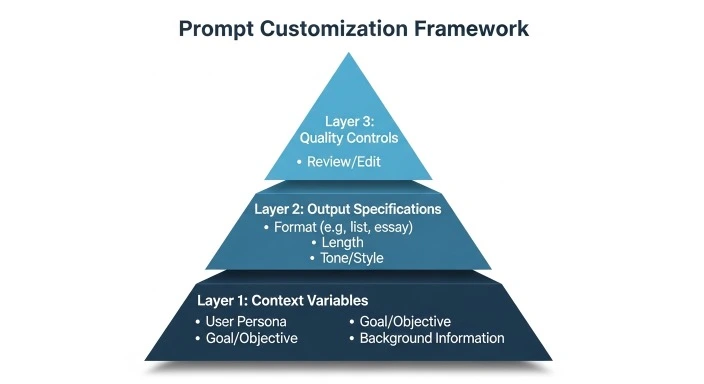
The prompts above are templates. Here’s how to make them work specifically for your situation:
The 3-Layer Customization Framework
Layer 1: Context Variables (Required)
Always include:
- Your specific role/industry
- Your current constraints (time, budget, resources)
- Your actual goal (not a generic one)
- Why you’re asking now (timing/urgency)
Layer 2: Output Specifications (Recommended)
Specify:
- Format you need (email, list, table, script)
- Length constraints (word count, time to read)
- Tone requirements (formal, casual, technical)
- Audience who will see this
Layer 3: Quality Controls (Advanced)
Add requirements like:
- “Challenge my assumptions”
- “Focus on [specific aspect]”
- “Avoid [common mistake]”
- “Prioritize [criterion] over [other criterion]”
Real Example of Customization
Generic prompt:
“Help me plan my week”
Customized prompt:
“I’m a freelance marketing consultant with 3 active clients, 2 proposals due this week, and a family commitment on Wednesday afternoon. My priority is finishing the Johnson proposal by Thursday EOD. Plan my week considering I do best work 9am-12pm, have video calls most afternoons, and need to protect at least one evening for family. Show me what to prioritize, what to push, and where I’m overcommitted.”
The difference? The second gives ChatGPT actual constraints and priorities to work with.
Common Mistakes to Avoid
Mistake 1: Expecting Perfect First Drafts
ChatGPT is best as a starting point, not a finished product. Plan to refine responses with follow-ups like:
- “Make this more specific to [situation]”
- “The tone is too formal, make it more conversational”
- “Focus more on [aspect] and less on [other aspect]”
Mistake 2: Not Providing Enough Context
Bad: “Write a proposal”
Better: “Write a 2-page proposal to secure $5K budget for a content marketing pilot, addressing CFO concerns about ROI, due Friday”
More context = better output.
Mistake 3: Asking for Decisions Instead of Frameworks
ChatGPT can’t make your decisions. It excels at:
- Organizing your thinking
- Revealing trade-offs
- Providing frameworks
- Challenging assumptions
But you still need to apply judgment.
Mistake 4: Treating Prompts as Sacred
The prompts in this guide are starting points. Modify them! Remove sections that don’t apply. Add specifications for your unique situation. Make them yours.
Mistake 5: Not Saving What Works
When a customized prompt produces great results, save it in ChatGPT Projects so you can reuse it. Build your own prompt library over time.
Frequently Asked Questions
Q: Do these prompts work with the free version of ChatGPT?
Yes, all prompts work with both free and paid ChatGPT plans. However, ChatGPT Go offers 10× more messages, uploads and image creation, plus longer Memory and context, which is valuable for power users who run many prompts daily. The free tier works fine for occasional use.
Q: How do I know which prompt to use when?
Start with your immediate problem. Need to plan? Use planning prompts. Stuck in email? Use communication prompts. The categories in this guide map to common workflow bottlenecks. Bookmark 3-5 prompts you’ll use weekly and start there.
Q: Can I modify these prompts for my specific industry?
Absolutely—you should! Add industry-specific terminology, compliance requirements, or constraints unique to your field. For example, healthcare professionals might add HIPAA considerations, while teachers might reference curriculum standards.
Q: What if ChatGPT’s response isn’t what I need?
Use follow-up prompts to refine:
- “This is too generic, make it specific to [your situation]”
- “I need this shorter/longer”
- “Focus on [specific aspect] instead”
- “Give me 3 different approaches”
Iteration is normal and expected.
More FAQ
Q: How do these prompts work with ChatGPT’s new features in 2026?
These prompts are designed to work with GPT-5.2’s improvements in info-seeking questions, how-tos and walk-throughs, technical writing, and translation. The newer models understand context better and provide more measured, grounded responses—making these prompts even more effective than they were with older versions.
Q: Should I use these prompts with ChatGPT Voice?
Many of these prompts work great with improved Voice responses in ChatGPT, especially during commutes or when multitasking. The planning and brainstorming prompts work particularly well in voice format.
Q: How often should I update my saved prompts?
Review your most-used prompts quarterly. As your role evolves or priorities shift, update the context variables to reflect your current situation. Delete prompts you haven’t used in 6 months.
The Takeaway
These ChatGPT prompts for productivity aren’t meant to be used once and forgotten. The real value comes from:
- Testing 5-7 prompts that address your biggest time drains
- Customizing them for your specific workflow and constraints
- Saving the versions that work in Projects or a prompt manager
- Iterating based on results—some will work great, others need tweaking
The goal isn’t to use all 52 prompts. It’s to find the 10 that save you 5+ hours weekly and make them part of your routine.
Start with one category this week. If you’re drowning in meetings, begin with the meeting prompts. If planning is your weakness, start there. Pick your pain point and solve it with AI.
For more ways to integrate AI into your complete productivity system, explore our guide on organizing your life with AI tools in 2026. And if you’re specifically interested in how ChatGPT compares to other AI productivity assistants, our ChatGPT vs Claude comparison provides detailed analysis of which tool excels at different productivity tasks.
Remember: the best productivity system is the one you actually use. Start simple, build from there, and let these prompts evolve with your needs.
Our Authority Sources
1. OpenAI Official Documentation
The authoritative source for ChatGPT features, capabilities, and updates. All information about GPT-5.2, model capabilities, and February 2026 features was verified against OpenAI’s official help center and release notes.
2. OpenAI Model Release Notes
Provides detailed technical updates about model improvements, thinking modes, and capability enhancements. Essential for understanding what current ChatGPT versions can and cannot do.
3. Generation Digital – ChatGPT 2026 Features Analysis
Independent technology analysis publication providing comprehensive coverage of ChatGPT’s evolution, pricing tiers, and practical business applications in 2026.
4. Harvard Business Review – Productivity Research
Academic research on productivity systems, decision-making frameworks, and effective time management. Provides the theoretical foundation for many prompt engineering principles used in this guide.