

Most people don’t need to work harder.
They need to stop wasting energy.
Long days, endless to-do lists, and constant switching between tasks don’t usually mean you’re lazy or inefficient. They mean your system is overloaded.
This is where AI can help — not by pushing you to do more, but by helping you do less unnecessary work.
In this guide, you’ll learn how to save time with AI without working harder, without burning out, and without turning your day into a complicated system of tools and dashboards.
This is a practical, realistic approach — not hype.
This article is written for people who want to:
- Save time in daily work
- Reduce overwhelm
- Use AI in a realistic, human way
- Improve efficiency without burnout

What “Saving Time Without Working Harder” Actually Means
Saving time doesn’t mean:
- Cramming more tasks into your day
- Working longer hours
- Optimizing every minute
It means:
- Reducing friction
- Eliminating unnecessary steps
- Making fewer decisions
- Letting systems handle the background work
AI helps most when it removes invisible effort — the mental load you carry without noticing.
Why Working Harder Usually Backfires
When people feel behind, they often respond by:
- Working faster
- Skipping breaks
- Multitasking
- Overloading schedules
This leads to:
- Decision fatigue
- Lower quality work
- More mistakes
- Burnout
AI is useful because it shifts effort away from constant decision-making and toward focused execution.
How AI Helps You Save Time (Without Extra Effort)

AI saves time in four main ways.
1. It Reduces Decision Fatigue
One of the biggest time drains isn’t tasks — it’s deciding what to do next.
AI helps by:
- Suggesting priorities
- Grouping related tasks
- Highlighting what’s urgent
This reduces mental switching and keeps momentum steady.
2. It Automates Repetitive Background Work
Repetitive actions quietly steal time.
AI can handle:
- Turning emails into tasks
- Updating task status
- Scheduling reminders
- Organizing information
You don’t notice the time saved immediately — but it adds up fast.
3. It Helps You Plan More Realistically
Overplanning is a common productivity trap.
AI helps by:
- Estimating task duration
- Flagging overload
- Adjusting plans dynamically
This prevents the cycle of unrealistic schedules followed by frustration.
4. It Keeps Work Organized Without Constant Input
Instead of manually maintaining systems, AI:
- Keeps tasks organized
- Maintains structure automatically
- Reduces cleanup work
This saves time after the work is done — not just before.
Real-Life Ways to Save Time With AI (Practical Examples)

Let’s look at how this works in daily life.
Example: Daily Planning Without Overthinking
Instead of spending 20 minutes planning your day:
- Tasks are reviewed automatically
- Priorities are suggested
- A realistic plan is created
That’s time saved without effort.
Example: Fewer Context Switches
AI helps by:
- Grouping similar tasks
- Reducing interruptions
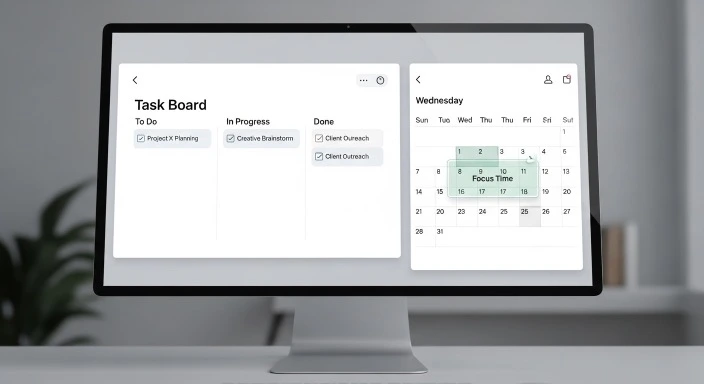
- Protecting focus time
Fewer switches mean faster completion — without rushing.
Example: Less Manual Organization
AI quietly:
- Keeps tasks sorted
- Updates progress
- Maintains structure
You stop spending time “managing the system.”
The Role of AI Productivity Tools
AI productivity tools are designed to support, not control.
They work best when:
- You use them lightly
- You avoid over-automation
- You keep systems simple
For a clear foundation, see: What is AI Productivity-How it Actually Works
Saving Time With AI for Freelancers and Professionals
Freelancers often lose time to:
- Admin work
- Task switching
- Follow-ups
- Mental overload
AI helps by:
- Organizing client work
- Automating reminders
- Reducing planning effort
A practical breakdown is available at: How Freelancers Automate Their Work With AI and Save Time
AI Productivity Tools vs “Productivity Pressure”
Many people misuse productivity tools by:
- Tracking everything
- Measuring every minute
- Optimizing endlessly
This increases stress.
AI saves time when it:
- Removes unnecessary steps
- Reduces decisions
- Supports natural rhythms
Not when it turns productivity into pressure.
What AI Can’t Do (Important Limits)
AI cannot:
- Replace discipline
- Fix poor boundaries
- Create motivation
- Remove all effort
AI works best when paired with:
- Clear priorities
- Reasonable expectations
- Simple routines
Understanding limits prevents disappointment.
How to Start Saving Time With AI (Without Overwhelm)
Follow this simple approach.
Step 1: Identify One Time Drain
Examples:
- Too much planning
- Constant task switching
- Manual organization
Step 2: Use One Tool Only
Avoid stacks and complex systems.
Step 3: Let It Run Quietly
No tweaking. No optimizing.
Step 4: Review After One Week
If it saved effort, keep it.
If not, try something else.
Common Mistakes That Cancel Time Savings
Avoid these traps:
- Using too many tools
- Automating everything
- Expecting instant results
- Over-tracking productivity
Time savings come from simplicity, not control.
People Also Ask: Saving Time With AI
Can AI really save time without more work?
Yes — when it removes friction instead of adding steps.
Is AI only useful for busy professionals?
No. Anyone managing tasks and decisions can benefit.
Does AI increase dependence?
Only if overused. Light use keeps control human.
How soon do people notice time savings?
Often within days, when the tool fits the problem.
Is AI better than traditional productivity tools?
It depends. AI helps more when complexity increases.
Do I need paid tools to save time?
Not at first. Many free tools are enough to start.
Will AI make me work faster?
It helps you work calmer, which often leads to speed naturally.
Final Thoughts
Saving time isn’t about doing more.
It’s about:
- Fewer decisions
- Fewer interruptions
- Less mental clutter
When used correctly, AI doesn’t push you to work harder.
It helps you stop wasting energy.
Our Authority Sources
Google Search Central documentation
According to Google’s official Search Central documentation, understanding how systems evaluate structure and clarity helps ensure information remains accessible and useful.
Independent productivity research studies
Research from McKinsey highlights how intelligent tools can reduce repetitive work and support better decision-making across modern workflows.
Workflow automation case studies
Real-world automation case studies show that removing repetitive manual steps can significantly reduce time spent on routine work.
Digital time-management reports
Psychological and workplace research indicates that reducing decision fatigue improves focus and long-term productivity.
SaaS productivity platform documentation
SaaS platform documentation demonstrates how modern tools are designed to streamline workflows through organization and automation.