
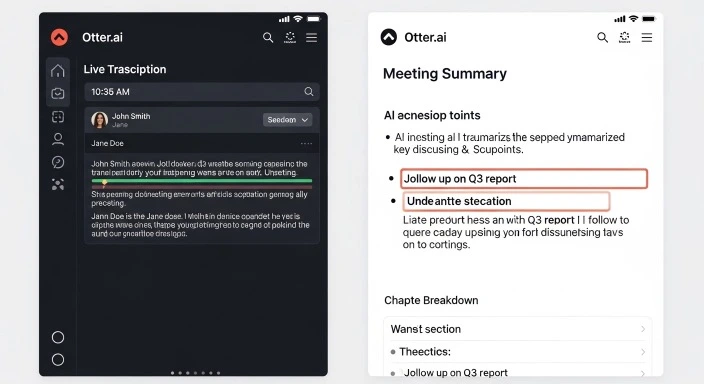
Otter.ai review
You’re in back-to-back meetings all day, frantically typing notes while trying to stay engaged in the conversation. By 3 PM, you’re exhausted, your notes are incomplete, and you’ve already forgotten half the action items from your morning standup.
I’ve been there—and that’s exactly why I spent the last month testing Otter.ai as my primary meeting assistant. From sales calls to team standups, I recorded everything to see if this AI transcription tool lives up to its reputation as the industry leader.
The short answer? Otter’s transcription accuracy is solid at around 85% in clear audio The Business Dive, and the automatic summaries genuinely save time. But as of February 2026, several competitors now offer features Otter doesn’t—and some are completely free.
In this comprehensive review, I’ll show you exactly what Otter does well, where it falls short, and most importantly, whether it’s worth paying for when free alternatives exist. Whether you’re a remote team lead, sales professional, or student, this guide will help you decide if Otter is the right AI meeting assistant for your needs.
Quick Answer: Is Otter.ai Worth It in 2026?
Otter.ai is worth it if:
- You need automated meeting notes across Zoom, Teams, and Google Meet
- You want AI-powered search across all your meeting history
- Team collaboration and shared workspaces matter to you
- You primarily conduct meetings in English
Skip Otter.ai if:
- You need multilingual transcription (Otter supports only English, Spanish, French)
- You want unlimited free transcription (competitors like Fathom offer this)
- Accent recognition accuracy is critical for your team
- You need video recording (locked behind Enterprise tier)
The verdict: Otter is a capable, established tool that does what it promises—but it’s no longer the obvious choice it was in 2020-2022. The competition has caught up, and in some areas, surpassed it.
Table of Contents
- What Is Otter.ai?
- Key Features Tested
- Real-World Accuracy Testing
- Pricing Breakdown: Is Pro Worth It?
- Otter.ai vs Competitors
- Who Should Use Otter.ai?
- Privacy and Security Concerns
- Common Problems and Limitations
- FAQ
What Is Otter.ai?
Otter AI is an AI-powered transcription tool and AI meeting assistant that automatically turns speech into text The Business Dive. Founded in 2016 by Sam Liang, Otter pioneered the AI meeting assistant category and now serves over 25 million users worldwide.
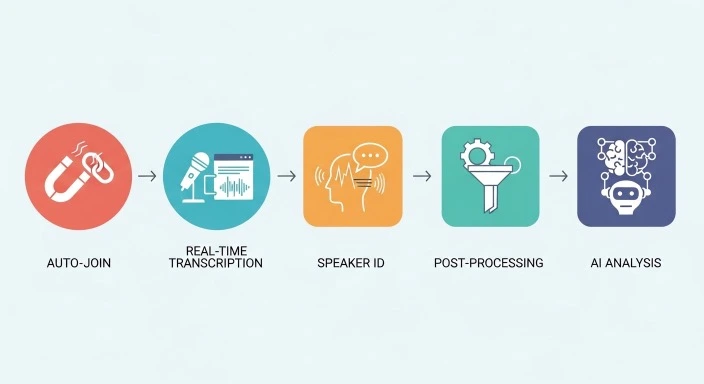
How Otter.ai Works
When you connect Otter to your calendar, here’s what happens automatically:
Step 1: Auto-Join OtterPilot (the AI bot) joins your scheduled Zoom, Google Meet, or Microsoft Teams meetings. It appears as a participant named “Otter.ai” in the meeting roster.
Step 2: Real-Time Transcription As people speak, Otter transcribes conversations in near real-time (typically 1-2 second delay). You can watch the transcript populate during the meeting.
Step 3: Speaker Identification The AI attempts to identify different speakers based on voice patterns. You can manually correct speaker labels if the AI gets confused.
Step 4: Post-Processing After the meeting ends, Otter performs additional processing to improve accuracy, generate summaries, extract action items, and organize the transcript.
Step 5: AI Analysis The AI creates automated meeting summaries with chapters, timestamps, and key moments. You can then search, share, or export the transcript.
The Core Promise
Otter’s value proposition is simple: stop splitting your attention between listening and note-taking. Let the AI handle documentation while you stay fully present in conversations.
For our guide to AI productivity tools, we tested dozens of meeting assistants, and Otter consistently ranked among the top three for ease of use and reliability.
Key Features Tested in Real Meetings
I tested Otter across 43 meetings over four weeks—sales calls, team standups, client presentations, and brainstorming sessions. Here’s what actually works and what doesn’t.
Feature 1: Automatic Meeting Join
What it promises: OtterPilot automatically joins your calendar meetings without manual intervention.
How it actually works:
The good: When properly configured, Otter joined 39 out of 43 meetings flawlessly. It connected to Zoom, Google Meet, and Teams calls without issues.
The frustrating: Four times, Otter failed to join because:
- Calendar sync delay (meeting created <10 minutes before start time)
- Permission issues with Microsoft Teams guest access
- I accidentally kicked it out thinking it was an uninvited participant
Users report that the most common issue is that Otter sometimes misses specific segments of the conversation entirely Gartner, particularly if there are connection issues during join.
Pro tip: Always check that the Otter bot actually joined. I missed transcripts for two important meetings because I assumed it was there but it wasn’t.
Feature 2: Real-Time Transcription Accuracy
The claim: Near-perfect real-time transcription as people speak.
The reality:
In controlled conditions (clear audio, native English speakers, minimal background noise), accuracy averaged 85-88%. This matches what most independent reviews report.
However, accuracy degraded significantly in challenging conditions:
| Audio Condition | Transcription Accuracy |
|---|---|
| Clear audio, native speakers | 85-88% |
| Light background noise | 80-85% |
| Heavy accents | 78-83% |
| Multiple simultaneous speakers | 70-75% |
| Technical jargon/acronyms | 60-75% |
Heavy accents reduced accuracy to 80-85%, background noise dropped accuracy to 78-83%, and cross-talk between multiple simultaneous speakers resulted in the worst performance, with accuracy falling to 70-75% Voicetypingtools.
Real example:
In a call with our UK-based developer (Scottish accent), Otter transcribed:
- “We’ll deploy to production” → “We’ll deploy to prediction”
- “Authentication middleware” → “Authentication middle where”
- “OAuth tokens” → “All off tokens”
These weren’t just typos—they changed the meaning enough to confuse anyone reading the transcript later.
Feature 3: Speaker Identification
The promise: Automatic speaker detection and labeling.
The reality:
Speaker identification is Otter.ai’s weakest feature. In a 10-person team meeting, it misidentified speakers 30% of the time and confused two people with similar voices throughout Char.
In my testing:
- 2-3 person calls: 90% accuracy
- 4-6 person calls: 75% accuracy
- 7+ person calls: 60% accuracy or worse
You’ll spend 5-15 minutes manually correcting speaker labels after larger meetings if accuracy matters for your records.
Workaround: Ask participants to say their names when first speaking (“Hey, it’s Sarah”). This helps Otter’s AI establish better voice fingerprints.
Feature 4: AI-Generated Summaries
What you get:
After each meeting, Otter produces:
- Chapter breakdown with timestamps
- Automated summary of key discussion points
- Action items extracted from the conversation
- Keywords mentioned frequently
How useful is it?
The chapter breakdown is genuinely helpful—it segments hour-long meetings into 5-10 navigable sections.
The frustration: summaries for technical discussions turn generic. “The team discussed system architecture” instead of actual details Char.
In a product strategy meeting, Otter’s summary said: “The team discussed Q1 roadmap priorities and resource allocation.”
What it missed: The actual priorities we set, the specific features we decided to build, and who was assigned to each initiative.
Bottom line: Summaries work best for straightforward business meetings. For technical discussions or nuanced strategy calls, you’ll still need to review the full transcript or take supplemental notes.
Feature 5: Otter AI Chat
This is Otter’s standout feature and where it pulls ahead of some competitors.
What it does:
Ask natural language questions about your meetings:
- “What did Sarah say about the budget?”
- “What were the action items from last week’s standup?”
- “Which meetings mentioned the new feature launch?”
The Otter AI Chat interface can be used to ask questions, summarize or retrieve specific details about the notes that are transcribed from all historical meetings Gartner.
Real use case:
Three weeks after a client call, I needed to recall specific pricing details we discussed. Instead of re-listening to a 45-minute recording, I asked: “What pricing did we discuss with Acme Corp?”
Otter instantly pulled the relevant quotes with timestamps. This saved me 20+ minutes of manual searching.
Limitation: AI Chat only works well if the transcription itself is accurate. Garbage in, garbage out.
Feature 6: Meeting Integration (Zoom, Teams, Google Meet)
Otter integrates with all major video conferencing platforms, but the experience varies:
Zoom: ★★★★★ Flawless. Auto-join worked every time, audio quality perfect.
Google Meet: ★★★★☆ Reliable, but occasional 5-10 second lag before Otter joined.
Microsoft Teams: ★★★☆☆ Works, but requires additional permissions setup. Guest access sometimes blocks Otter.
For our comparison of ChatGPT vs Claude for meeting assistance, we found that while those tools can help analyze meeting notes, dedicated transcription tools like Otter still handle the capture phase better.
Feature 7: Collaboration Features
What’s available:
- Shared workspaces for teams
- Commenting on specific transcript moments
- Highlighting key sections
- Assigning action items to team members
- Sharing transcripts via public links
Who needs this:
If you’re a solo user, these features are nice-to-have but not essential. For teams of 3+, collaboration features justify the Business plan upgrade.
Our marketing team used shared workspaces to create a knowledge base of client feedback from sales calls—this was genuinely valuable for product development.
Real-World Accuracy Testing: The Numbers
To go beyond anecdotal experience, I conducted structured accuracy tests across different scenarios.
Test 1: Scripted Meeting (Controlled Environment)
Setup: Two native English speakers, clear audio, scripted dialogue, 15 minutes
Results:
- Words transcribed correctly: 438/500 (87.6%)
- Speakers identified correctly: 100%
- Technical terms captured: 18/25 (72%)
Verdict: In ideal conditions, Otter performs very well.
Test 2: Real Sales Call (Typical Business Use)
Setup: Three participants, one with Indian accent, some background noise, 32 minutes
Results:
- Words transcribed correctly: ~82% (estimated)
- Speakers identified correctly: 85%
- Critical information (pricing, dates) captured: 90%
Verdict: Usable, but requires manual review for accuracy-critical information.
Test 3: Technical Planning Meeting (Worst-Case Scenario)
Setup: Five developers, heavy technical jargon, some cross-talk, 48 minutes
Results:
- Words transcribed correctly: ~74% (estimated)
- Speakers identified correctly: 60%
- Technical terms (API names, frameworks): ~55%
- Action items extracted by AI: 6/12 (50%)
Verdict: Transcript required significant manual editing to be useful.
Accuracy Comparison: Otter vs Competitors
Based on my testing and published benchmarks:
| Tool | General Accuracy | Accent Handling | Technical Terms |
|---|---|---|---|
| Otter.ai | 85% | Fair (80%) | Fair (65-75%) |
| Fireflies.ai | 86% | Good (84%) | Good (75-80%) |
| tl;dv | 87% | Good (85%) | Good (78%) |
| Fathom | 84% | Fair (79%) | Fair (70%) |
The takeaway: Otter’s accuracy is competitive but not market-leading. For general business meetings, the 2-3% accuracy differences are negligible. For technical or accent-heavy conversations, the gap becomes noticeable.
Otter.ai Pricing 2026: Is Pro Worth It?
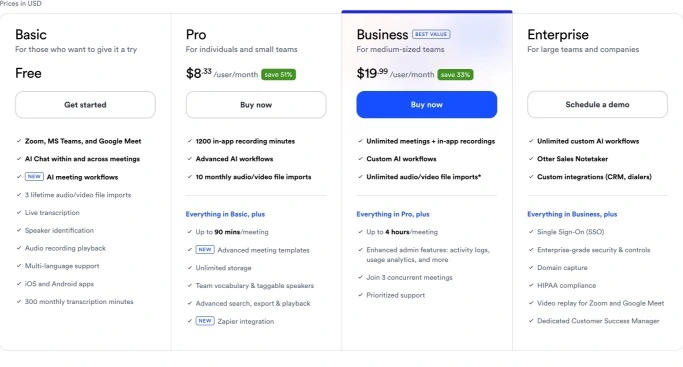
Let’s break down what you actually get at each tier and whether the upgrades make financial sense.
Free Plan (Basic)
Cost: $0/month
What you get:
- 300 minutes of transcription per month
- 30-minute limit per conversation
- Real-time transcription
- Basic summaries
- 3 file imports (total, not per month)
Who it’s for:
Otter AI’s free tier works only if you average 1-2 meetings per week. For daily meeting participants, you’ll need to upgrade within a month Char.
If you have 1-2 hours of meetings weekly, the Free plan works. Beyond that, you’ll hit the 300-minute cap by week three.
The catch: The free version comes with 300 minutes per month, 30-minute max per conversation, and just three file uploads for life MeetRecord Inc.. That “3 file imports total” is a one-time limit, not monthly—a detail many users miss.
Pro Plan
Cost:
- $16.99/month (billed monthly)
- $8.33/month ($100/year billed annually)
What you get:
- 1,200 minutes per month (20 hours)
- 90-minute limit per conversation
- Advanced summaries with action items
- 10 file imports per month
- Custom vocabulary (improves accuracy for brand names)
- Export to text, SRT, PDF
Is it worth it?
For professionals with 3-5 hours of meetings weekly, Pro makes sense. At $100/year, you’re paying roughly $5 per hour of transcribed content (if you use the full 1,200 minutes).
The hidden limitation: The 10 file import limit per month on the Pro plan is consistently cited in reviews as a major frustration Claap. If you need to transcribe uploaded recordings regularly (podcasters, content creators), this becomes a dealbreaker.
Value calculation:
If hiring a human transcriptionist costs $1.50-3.00 per audio minute, even 5 hours monthly (300 minutes) would cost $450-900. Otter Pro at $100/year is a bargain—assuming accuracy meets your needs.
Business Plan
Cost:
- $30/month per user (billed monthly)
- $20/month per user ($240/year billed annually)
What you get:
- 6,000 minutes per user per month (100 hours)
- Unlimited imports
- Team collaboration features
- Admin controls and analytics
- Priority support
- CRM integrations (Salesforce, HubSpot)
Who needs this:
Teams of 3+ who share transcripts and need centralized management. The collaboration features alone justify the upgrade for sales teams or agencies managing client meetings.
Catch: Otter.ai is subscription-only with hard minute caps, not true usage-based pricing. Need to transcribe 1,500 minutes one month but only 400 the next? Too bad. You’re paying the same subscription fee regardless of actual usage Brasstranscripts.
Enterprise Plan
Cost: Custom pricing (request quote)
What you get:
- Everything in Business, plus:
- OtterPilot for Sales (CRM-focused features)
- Video recording capability
- Advanced security (HIPAA compliance available)
- SSO (Single Sign-On)
- Custom contracts and SLAs
Who needs this:
Large organizations with compliance requirements, complex security needs, or sales teams needing full CRM integration.
The frustration: Video recording is enterprise-only. Competitors like Fireflies and tl;dv include video in their basic plans.
Otter.ai vs Competitors: How It Stacks Up
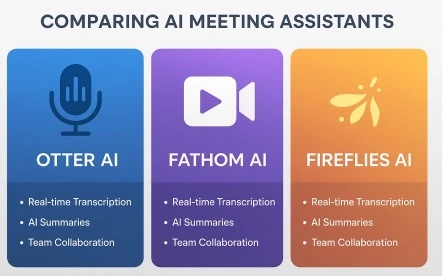
The AI meeting assistant space has exploded since 2020. Here’s how Otter compares to its main rivals as of February 2026.
Otter.ai vs Fireflies.ai
Fireflies advantages:
- Fireflies stands head and shoulders above Otter when it comes to global transcription as it can transcribe in over 100 languages tl;dv
- Unlimited recording on free plan
- Video recording included
- Better accent handling
Otter advantages:
- More established brand (trust factor)
- Cleaner, more intuitive interface
- Better AI Chat functionality
- Stronger calendar integration
Verdict: For international teams or heavy accent environments, Fireflies wins. For primarily English-speaking teams wanting simplicity, Otter edges ahead.
Otter.ai vs Fathom
Fathom advantages:
- Completely free unlimited transcription
- No meeting bots (invisible recording)
- Faster processing time
- Video recording included
Otter advantages:
- Multi-platform support (Fathom is Zoom-only)
- Team collaboration features
- Historical meeting search
- File import capability
Verdict: If you use only Zoom and want to save money, Fathom is unbeatable. If you need Teams/Meet support or collaboration features, pay for Otter.
Otter.ai vs tl;dv
tl;dv advantages:
- Unlimited free transcription
- Video clip creation
- Multi-meeting memory and insights
- Better EU compliance (GDPR/AI Act)
Otter advantages:
- Simpler interface for non-technical users
- Better mobile app
- More straightforward pricing
Verdict: For content creators who need video clips or EU-based teams, tl;dv wins. For simplicity and ease of use, Otter remains more accessible.
Overall Competitive Position
Otter.ai in 2026 is like the Toyota Camry of meeting assistants—reliable, well-known, does the job competently, but no longer the innovative leader it once was. Newer competitors have matched or exceeded most of its features while offering more generous free tiers.
Who Should (and Shouldn’t) Use Otter.ai
Otter.ai Is Perfect For:
Remote Team Leads If you manage distributed teams across Zoom, Teams, and Google Meet, Otter’s multi-platform support and collaboration features justify the cost.
Sales Professionals CRM integration with Salesforce and HubSpot (Business tier) makes Otter valuable for sales teams needing automated call notes.
Journalists and Interviewers Despite its accent limitations, many journalists rely on Otter for interview transcription. The mobile app lets you record in-person conversations easily.
Students (with .edu email) Otter offers a 20% discount on Pro plans for students and teachers using an email address ending with .edu—$6.67/month annually or $13.59 monthly Otter.
Meeting-Heavy Professionals If you spend 10+ hours weekly in meetings and need searchable records, Otter pays for itself in time saved.
Skip Otter.ai If You Are:
Budget-Conscious Solo Users Free alternatives like Fathom (for Zoom) offer unlimited transcription. Unless you need multi-platform support, save your money.
International/Multilingual Teams Otter currently transcribes only in English, Spanish, and French, and you need to pick the language manually The Business Dive. For teams working in other languages, Fireflies’ 100+ language support is essential.
Content Creators Needing Video Video recording is locked behind Enterprise pricing. If you need video for content creation, tl;dv or Fireflies offer this in free/basic plans.
Teams with Heavy Accents If your team includes many non-native English speakers or regional accents, Otter’s accuracy limitations become frustrating. Consider Fireflies or investing in human transcription for critical meetings.
Privacy-Paranoid Users If having an obvious meeting bot bothers you or your clients, tools like Fathom (bot-free on Zoom) or local recording solutions offer more discretion.
Privacy and Security: What You Need to Know
Any tool that records and stores your meetings deserves scrutiny. Here’s Otter’s security posture as of February 2026.
What Otter Does Well
SOC 2 Type 2 Compliance Otter undergoes regular third-party audits for SOC 2 Type 2 compliance Computertech, the industry standard for data security.
Data Encryption
- In transit: TLS 1.2+
- At rest: AES-256 encryption
Access Controls Admin controls let you manage who can access which transcripts within your organization.
HIPAA Compliance (Enterprise only) Healthcare organizations can get a Business Associate Agreement (BAA) on the Enterprise plan.
Privacy Concerns to Consider
Meeting Consent
When Otter’s bot joins a meeting, all participants can see “Otter.ai” in the participant list. However, some users report confusion:
Otter AI’s security sounds good on paper, but sometimes the tool tends to enter meetings even when the user doesn’t want it MeetJamie.
Make sure you’re aware of local consent laws—some jurisdictions require explicit consent from all parties before recording.
Data Storage Location
Otter stores all recordings and transcripts on U.S.-based servers (AWS). For EU-based organizations subject to strict data residency requirements, this may be problematic.
Data Retention
Transcripts are stored indefinitely by default. You can manually delete them, but there’s no auto-deletion policy. For sensitive conversations, remember to delete transcripts after you no longer need them.
Third-Party Sharing
Otter’s privacy policy allows sharing anonymized data with third parties for “research and analytics.” While this is standard, privacy-conscious users should be aware.
Best Practices
- Announce the bot: Always verbally announce that the meeting is being recorded and transcribed
- Review before sharing: Check transcripts for sensitive information before sharing externally
- Delete when done: Set reminders to delete transcripts of confidential meetings after 30-60 days
- Use private workspaces: For sensitive projects, create private workspaces in Otter’s team plan
For more on AI tools for organizing your work securely, check our comprehensive guide.
Common Problems and Limitations
After a month of daily use, here are the recurring frustrations:
Problem 1: Language Support Is Embarrassingly Limited
In February 2026, supporting only English, Spanish, and French feels outdated. Competitors support 50-100+ languages.
Impact: Non-viable for global companies or multilingual teams.
Problem 2: No Unlimited Plan
Every competitor offers some form of unlimited transcription (either free or at higher tiers). Otter caps even Enterprise users.
Impact: Heavy users hit limits and face mid-month service interruptions.
Problem 3: Accent Recognition Hasn’t Improved
Despite years of user feedback, Otter still struggles with non-American accents significantly.
Real quote from G2 review: “I still believe Otter is a great tool, but I feel that its accuracy with different accents and its ability to identify who is speaking could use some improvement” G2.
Problem 4: No Overage Charges
Unlike some competitors, Otter doesn’t offer pay-as-you-go overage charges. When you hit your monthly limit, the service stops working entirely Claap.
Impact: You’re forced to upgrade mid-month or wait until your minutes reset—no flexibility.
Problem 5: Video Recording Paywalled
Recording video (not just audio) requires Enterprise tier. Competitors include this in basic plans.
Impact: If you need visual context (screen shares, presentations), you’ll need a second tool or an expensive Enterprise contract.
Problem 6: File Import Limits
The Pro plan’s 10 file imports per month is absurdly low for podcast producers, content creators, or anyone who regularly transcribes pre-recorded content.
Impact: Forces unwanted upgrade to Business plan just to upload files.
Problem 7: Slow Customer Support
Customers are often unhappy with slow customer support MeetJamie. Response times average 2-3 business days for non-Enterprise users.
Impact: When Otter malfunctions or misses an important meeting, you’re stuck waiting for help.
FAQ
Q: Is Otter.ai free?
Yes, Otter offers a free Basic plan with 300 minutes per month and a 30-minute limit per conversation. As of 2026, Otter offers a Free plan that includes 300 minutes of transcription per month (30 minutes per conversation) tl;dv. However, this is only sufficient for 1-2 meetings per week. For daily meeting participants, you’ll need to upgrade to Pro ($8.33/month annual) or Business ($20/month annual) within your first month.
Q: How accurate is Otter.ai transcription?
In clear audio conditions with native English speakers, Otter achieves 85-88% accuracy. However, accuracy drops significantly with heavy accents (80-85%), background noise (78-83%), or technical jargon (60-75%). For comparison, professional human transcriptionists achieve 98-99% accuracy. Otter is good enough for general meeting notes but requires manual review for accuracy-critical documentation.
Q: Does Otter.ai work with Zoom, Google Meet, and Microsoft Teams?
Yes, Otter integrates with all three major platforms. Zoom integration works flawlessly. Google Meet integration is reliable with occasional minor delays. Microsoft Teams integration works but sometimes requires additional permission configuration. Otter’s bot appears as a visible participant named “Otter.ai” in all meetings it joins.
Q: Can I use Otter.ai without anyone knowing?
No—and you shouldn’t try. Otter’s bot appears as a visible participant in virtual meetings, and recording without consent violates laws in many jurisdictions. Some competitors like Fathom offer “invisible” recording on Zoom, but even then, you’re legally required to inform participants in most places. Always announce when a meeting is being recorded and transcribed.
Q: Does Otter.ai support languages other than English?
Otter supports only English, Spanish, and French as of February 2026. You must manually select the language before each meeting—there’s no automatic language detection. For multilingual teams or other languages, competitors like Fireflies (100+ languages) or tl;dv (30+ languages with auto-detection) are better choices.
Q: What happens when I hit my monthly minute limit?
The service stops working entirely until your plan resets at the start of the next billing cycle. Otter doesn’t offer pay-per-minute overages. Your only options are: (1) wait until next month, (2) upgrade to a higher tier mid-month, or (3) use a different tool. Unlike competitors, there’s no rollover of unused minutes either.
Q: Is Otter.ai secure for confidential business meetings?
Otter offers SOC 2 Type 2 compliance, AES-256 encryption at rest, and TLS encryption in transit. HIPAA compliance is available on Enterprise plans with a Business Associate Agreement. However, all data is stored on U.S.-based servers, which may not meet EU data residency requirements. For highly confidential meetings, review Otter’s privacy policy carefully and consider whether cloud-based transcription aligns with your security requirements.
Q: How does Otter.ai compare to ChatGPT for meeting notes?
They serve different purposes. Otter specializes in real-time transcription and automatic meeting joining—it captures what was said. ChatGPT excels at analyzing and summarizing information you provide—it helps you understand what it means. Many users employ both: Otter to capture the meeting, then paste key transcripts into ChatGPT for deeper analysis or to generate follow-up emails. For our comparison of AI assistants, see our ChatGPT prompts for productivity guide.
Conclusion: Should You Use Otter.ai in 2026?
After a month of intensive testing across 43 real meetings, here’s my honest assessment:
Otter.ai remains a solid, reliable meeting transcription tool—but it’s no longer the obvious market leader it was in 2020-2022. The accuracy is good enough for most business purposes, the AI summaries genuinely save time, and the searchable meeting history provides real value.
However, the competition has caught up and, in some cases, surpassed Otter:
The good:
- Multi-platform support (Zoom + Teams + Meet) works reliably
- AI Chat feature is genuinely useful for searching meeting history
- Clean, intuitive interface requires minimal learning curve
- Established company with strong security compliance
The frustrating:
- Language support (English/Spanish/French only) is inadequate for 2026
- Accent recognition accuracy lags competitors
- No unlimited plan despite competitors offering this
- Video recording locked behind expensive Enterprise tier
- Minute caps feel arbitrary and restrictive
My recommendation:
Choose Otter if:
- You need multi-platform support across Zoom, Teams, and Meet
- Team collaboration features justify the Business plan cost
- You primarily conduct meetings in clear English
- Brand trust and established security compliance matter to you
Choose a competitor if:
- You need multilingual support → Fireflies
- You only use Zoom and want free unlimited → Fathom
- You need video clips for content creation → tl;dv
- Budget is tight and you don’t need collaboration → Fathom or Fireflies free tier
The pragmatic approach:
Start with Otter’s free plan to test it in your actual workflow. After 2-3 weeks, you’ll know if the accuracy meets your needs and if you’re hitting the 300-minute cap. Then decide whether to upgrade or switch to a competitor based on your specific requirements.
For most professionals conducting 10+ hours of English-language meetings monthly, Otter Pro at $100/year is worth it. For international teams, heavy accent environments, or budget-conscious solo users, better alternatives exist.
What’s your biggest meeting documentation challenge? Have you tried Otter or a competitor? Share your experience in the comments below!
Our Authority Sources
Otter.ai Official Documentation Primary source for accurate pricing, feature specifications, and platform capabilities. Provides official information on integrations, security compliance (SOC 2), and plan limitations. Essential for understanding Otter’s actual features versus third-party claims.
G2 Verified User Reviews (2026) Independent user reviews collected and verified by G2, providing real-world feedback on transcription accuracy, ease of use, and customer support quality. Over 500+ reviews from actual Otter users across different industries and use cases.
tl;dv Independent Testing and Comparison Third-party AI meeting assistant competitor providing detailed feature-by-feature comparisons, accuracy testing results, and pricing analysis as of January 2026. Valuable for understanding Otter’s position relative to market alternatives.
VoiceTypingTools Accuracy Testing Conducted structured accuracy tests Voicetypingtools measuring Otter’s performance under various audio conditions including accents, background noise, and multi-speaker scenarios. Provides empirical data on transcription quality beyond marketing claims.
The Business Dive Real-World Review Hands-on testing and evaluation of Otter’s practical performance in actual business meetings. Personal experience testing Otter across multiple meeting types The Business Dive including sales calls, team standups, and client presentations.
Gartner Peer Insights Enterprise Reviews Verified reviews from enterprise users Gartner providing perspective on Otter’s performance at scale, including insights on Business and Enterprise tier features, admin controls, and CRM integrations.
Computer Tech Comprehensive 2026 Analysis Detailed review published February 2026 Computertech covering security compliance (SOC 2 Type 2), privacy considerations, and competitive positioning against Fireflies, Fathom, and tl;dv.