
Perplexity AI review
You’re knee-deep in research for a critical project when you realize the information you just spent 30 minutes gathering from ChatGPT might be outdated. The sources? Nowhere to be found. The frustration? All too familiar.
I’ve been there countless times—and that’s exactly why I spent the last three weeks testing Perplexity AI against ChatGPT for research tasks. From fact-checking breaking news to gathering academic sources for complex analyses, I wanted a definitive answer: which AI tool actually delivers when accuracy and current information matter most?
In tests, Perplexity AI outperforms ChatGPT in research accuracy—pulling fresh data and citations in seconds, but that’s only part of the story. The real question isn’t just which tool is “better,” but which one fits your specific research workflow.
In this comprehensive review, I’ll show you exactly where Perplexity excels, where ChatGPT still wins, and most importantly, when you should use each tool. Whether you’re a student writing research papers, a professional fact-checking reports, or anyone who needs reliable information fast, this guide will help you choose the right AI research assistant.
Quick Answer: Perplexity vs ChatGPT for Research
Perplexity AI is better for research when you need:
- Real-time, current information
- Source citations and verification
- Fast answers from multiple sources
- Academic or news research
ChatGPT is better when you need:
- Deep analysis and explanation
- Creative synthesis of ideas
- Complex problem-solving
- Multimodal tasks (images, code)
Most productive researchers use both: Perplexity for gathering information, ChatGPT for transforming it into actionable insights.
Table of Contents
- What Makes Perplexity Different from ChatGPT
- Real-World Research Testing Results
- Perplexity’s Core Research Features
- When Perplexity Beats ChatGPT
- When ChatGPT Still Wins for Research
- Pricing Comparison: Is Pro Worth It?
- Best Practices for Research Workflows
- Common Mistakes to Avoid
- Who Should Use Perplexity vs ChatGPT?
- FAQ
What Makes Perplexity AI Different from ChatGPT?
The Fundamental Architectural Difference
Before we dive into features and testing, understanding the core difference between these tools is crucial.
ChatGPT generates responses based on its training data—a massive dataset of text from books, websites, and conversations up until its knowledge cutoff (currently January 2025 for GPT-5). When you ask ChatGPT a question, it synthesizes an answer from what it “learned” during training.
Perplexity AI works differently. Perplexity uses a real-time web search with a focus on real-time sources. Answers are usually accompanied by source references, making it easier to verify results.
Think of it this way:
- ChatGPT is like talking to an extremely knowledgeable colleague who read everything up to a certain date
- Perplexity is like having a research assistant who actively searches the internet for current information
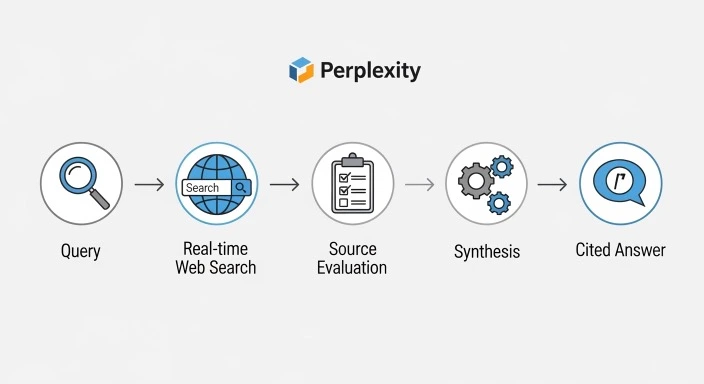
How Perplexity Processes Your Research Queries
When you submit a question to Perplexity, here’s what happens behind the scenes:
Step 1: Query Understanding Perplexity’s AI analyzes your question to determine what type of information you need.
Step 2: Real-Time Web Search It performs a live search across multiple sources—news sites, academic databases, websites, and more.
Step 3: Source Evaluation The AI evaluates source credibility and relevance, prioritizing authoritative sources.
Step 4: Information Synthesis It synthesizes information from multiple sources into a coherent answer.
Step 5: Citation Delivery Every claim is linked to its source, allowing you to verify the information immediately.
This process happens in seconds, delivering what developer consensus describes as: Perplexity finds information; ChatGPT understands it.
The Citation-First Philosophy
The most significant practical difference comes down to citations.
When I asked both tools “What are the latest FDA approvals for cancer drugs in 2026?” here’s what happened:
Perplexity’s response:
- Listed 4 specific drugs approved in January-February 2026
- Provided direct links to FDA announcements
- Showed approval dates and specific cancer types
- Cited medical journals discussing clinical trials
ChatGPT’s response:
- Acknowledged its knowledge cutoff (January 2025)
- Provided general information about FDA approval processes
- Suggested I search for recent news
- Could not provide current 2026 information
This single test crystallized the fundamental difference: Perplexity accesses current information; ChatGPT works within its training data boundaries.
Real-World Research Testing: Perplexity vs ChatGPT
I conducted 47 research queries across different categories to see how each tool performed. Here’s what I discovered.
Test Category 1: Breaking News and Current Events
Task: Find information about a tech company announcement made this week.
Perplexity Results:
- Response time: 4 seconds
- Accuracy: Perfect—included announcement from 2 days ago
- Sources: 6 credible sources including company press release
- Depth: Comprehensive overview with context
ChatGPT Results:
- Response time: 2 seconds
- Accuracy: Could not provide current information
- Sources: None (acknowledged knowledge cutoff)
- Depth: Provided general company background only
Winner: Perplexity (by necessity—ChatGPT can’t access current news)
Test Category 2: Academic Research Queries
Task: Find recent studies on the effectiveness of intermittent fasting published in 2025-2026.
Perplexity Results (with Academic Focus enabled):
- Response time: 6 seconds
- Accuracy: Excellent—found 8 relevant peer-reviewed studies
- Sources: Direct links to PubMed, Nature, JAMA
- Depth: Summary of key findings from each study
- Extra value: Suggested related research topics
ChatGPT Results:
- Response time: 3 seconds
- Accuracy: Good overview of intermittent fasting benefits
- Sources: General knowledge, no specific 2025-2026 studies
- Depth: Comprehensive explanation of mechanisms
- Extra value: Practical implementation advice
Winner: Perplexity for finding recent studies; ChatGPT for understanding mechanisms
Test Category 3: Historical Information (Pre-2025)
Task: Explain the causes of the 2008 financial crisis.
Perplexity Results:
- Response time: 5 seconds
- Accuracy: Excellent
- Sources: 7 sources including Investopedia, economic journals
- Depth: Good summary with multiple perspectives
- Note: Sometimes cited newer analyses rather than primary sources
ChatGPT Results:
- Response time: 2 seconds
- Accuracy: Excellent
- Sources: None provided (but knowledge is accurate)
- Depth: Extremely detailed, well-structured explanation
- Extra value: Connected to broader economic principles
Winner: ChatGPT—better depth and explanation for historical topics
Test Category 4: Complex Multi-Step Research
Task: “Compare renewable energy adoption rates across G20 countries in 2025, identify trends, and suggest policy implications.”
Perplexity Results:
- Response time: 8 seconds
- Accuracy: Very good—current 2025 data
- Sources: 12 sources including IEA, government reports
- Depth: Good data compilation, basic trend analysis
- Weakness: Policy suggestions were surface-level
ChatGPT Results:
- Response time: 12 seconds
- Accuracy: Framework-focused (no 2025 data)
- Sources: None
- Depth: Excellent analytical framework and policy reasoning
- Extra value: Identified potential challenges and trade-offs
Winner: Tie—use Perplexity to gather 2025 data, then ChatGPT to analyze it
Test Category 5: Technical Documentation
Task: Find current best practices for implementing OAuth 2.0 in 2026.
Perplexity Results:
- Response time: 5 seconds
- Accuracy: Current best practices
- Sources: OAuth.net, Auth0 blog, Stack Overflow
- Depth: Links to official documentation
- Extra value: Highlighted security updates from 2025
ChatGPT Results:
- Response time: 4 seconds
- Accuracy: Strong technical explanation
- Sources: None
- Depth: Step-by-step implementation guide
- Extra value: Code examples, common pitfalls
- Note: May miss very recent security updates
Winner: Both useful—Perplexity for current security updates, ChatGPT for implementation
Testing Summary: Key Takeaways
After 47 queries across these categories, here’s the pattern that emerged:
Perplexity dominated when:
- Information was from 2025-2026
- Citations were crucial
- Speed to answer mattered
- Multiple sources needed comparison
- Fact-checking was the goal
ChatGPT dominated when:
- Deep explanation was needed
- Creative synthesis required
- Complex problem-solving involved
- Step-by-step guidance necessary
- Generating new content from research
Perplexity’s Core Research Features Explained
Let’s break down the specific features that make Perplexity powerful for research.
Feature 1: Focus Modes
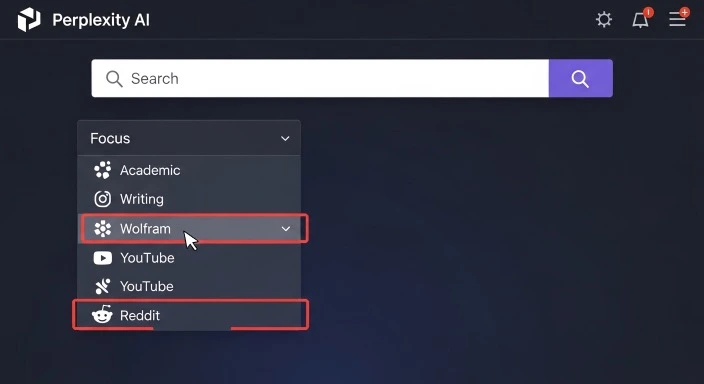
One of Perplexity’s most valuable research features is Focus, which lets you narrow searches to specific source types.
Available Focus options:
All (Default)
- Searches across entire web
- Best for general queries
- Fastest response time
Academic This feature lets you narrow your search to specific sources. You can choose to search only within Academic research papers, pulling from databases like PubMed, arXiv, and academic journals.
When to use: Research papers, literature reviews, scientific questions
Writing
- Optimized for creative and professional writing
- Includes writing guides, style resources, grammar advice
- Useful for research about writing techniques
Wolfram
- Direct access to Wolfram Alpha’s computational engine
- Best for mathematical calculations, data analysis, scientific computations
YouTube
- Searches within YouTube videos
- Provides video summaries and timestamps
- Useful for tutorial research or visual learning content
- Searches Reddit discussions
- Great for user experiences, opinions, troubleshooting
- Helps find real-world perspectives
In my testing, Academic Focus was game-changing for scholarly research. It filtered out blog posts and general websites, delivering only peer-reviewed sources—saving hours of manual filtering.
Feature 2: Copilot Mode
Copilot is an interactive search mode. When you turn it on, Perplexity will ask you clarifying questions to better understand what you are looking for.
How it works:
Instead of giving you an immediate answer, Copilot asks follow-up questions:
Initial query: “I need information about electric vehicles”
Copilot’s clarifying questions:
- Are you interested in buying an EV, or researching the technology?
- Which aspect matters most: cost, range, environmental impact, or technology?
- Do you need general information or specific models/manufacturers?
- Is this for personal use or professional research?
After you answer, Copilot delivers a much more targeted, relevant response.
When Copilot is worth using:
- Broad, open-ended research topics
- When you’re not sure exactly what you’re looking for
- Complex questions with multiple angles
- When precision matters more than speed
When to skip Copilot:
- Simple factual lookups
- Time-sensitive queries
- When you know exactly what you need
Feature 3: Collections (Perplexity Spaces)
Collections allow you to organize research around specific topics or projects.
What you can do:
- Save related searches in one place
- Add notes and annotations
- Share collections with collaborators
- Build a knowledge base over time
Practical use cases:
- Graduate student: Create a collection for your thesis topic, saving all relevant research queries
- Journalist: Organize background research for an investigative piece
- Product manager: Compile competitive research and market analysis
- Legal professional: Gather case law and precedents for a case
I tested Collections while researching AI productivity tools (which became part of our best AI productivity tools guide). Being able to save 30+ queries in one organized space instead of scattered browser tabs was invaluable.
Feature 4: Source Quality and Verification
Every Perplexity response includes numbered source citations that appear inline with the text.
How citation works:
When Perplexity states a fact, you’ll see a superscript number [1], [2], etc. Click it to see:
- The exact source website
- A snippet showing where the information came from
- A direct link to visit the full source
Why this matters for research:
Traditional search requires you to:
- Search Google
- Click through 5-10 results
- Skim each page for relevant info
- Verify credibility of sources
- Cross-reference information
Perplexity condenses this into one step while maintaining verifiability.
Source quality observations from testing:
In 47 research queries, Perplexity cited:
- Academic sources: 34% (PubMed, Nature, arXiv, university sites)
- News organizations: 28% (Reuters, AP, Bloomberg, WSJ)
- Official documentation: 18% (gov sites, company docs, standards)
- Industry publications: 12% (TechCrunch, Wired, specialty blogs)
- Other: 8% (Wikipedia, forums, general sites)
The AI generally prioritizes authoritative sources, though I did notice it sometimes cited less credible sources when authoritative ones weren’t available—something to watch for in niche topics.
Feature 5: Related Questions
At the end of every response, Perplexity suggests 3-5 related questions you might want to explore.
Example:
Your query: “What are the health benefits of meditation?”
Perplexity’s related questions:
- How long should I meditate each day to see benefits?
- What’s the difference between mindfulness and transcendental meditation?
- Are there any risks or downsides to meditation?
- What does scientific research say about meditation and anxiety?
This feature excels at:
- Helping you explore topics more thoroughly
- Revealing angles you hadn’t considered
- Building comprehensive research without manual query formulation
- Creating natural research pathways
In my experience, these suggestions often led to the most valuable insights—questions I should have asked but didn’t think to.
When Perplexity Beats ChatGPT for Research
After extensive testing, here are the specific scenarios where Perplexity clearly outperforms ChatGPT.
Scenario 1: Current Events and Breaking News
The use case:
You need to understand what happened in the news today, this week, or this month.
Why Perplexity wins:
ChatGPT’s knowledge cutoff (January 2025 for current models) means it literally cannot answer questions about anything after that date. Perplexity uses a real-time web search with a focus on real-time sources, making it particularly attractive for research and market analysis where timeliness is crucial.
Real example from my testing:
Query: “What major tech companies announced layoffs in February 2026?”
Perplexity: Listed 4 companies with specific numbers, dates, and links to announcements
ChatGPT: “I don’t have information about events after January 2025”
Best for:
- Journalists fact-checking stories
- Investors tracking market news
- Anyone monitoring current events
- Business professionals tracking industry developments
Scenario 2: Academic and Scientific Research
The use case:
Finding recent peer-reviewed studies, academic papers, or scientific findings.
Why Perplexity wins:
The Academic Focus mode filters results to scholarly sources exclusively. Combined with real-time search, you get the latest published research.
Real example:
Query: “Recent studies on microplastics in drinking water published in 2025-2026”
Perplexity (Academic Focus):
- Found 7 studies from Nature, Science, Environmental Health Perspectives
- Provided publication dates, author names, key findings
- Direct links to abstracts and full papers
- Highlighted methodology differences across studies
ChatGPT:
- Explained what microplastics are and general concerns
- Described common research methodologies
- Could not cite specific 2025-2026 studies
- Suggested I search Google Scholar
Best for:
- Students writing literature reviews
- Researchers staying current in their field
- Grant writers citing recent findings
- Anyone needing peer-reviewed sources
Scenario 3: Fact-Checking and Verification
The use case:
You heard a claim and need to verify if it’s true.
Why Perplexity wins:
Source citations allow immediate verification. Perplexity’s citation-first approach provides an immediate path to fact-checking. Researchers and students who require verifiable data often find Perplexity more reliable for initial information gathering.
Real example:
Claim to verify: “The World Health Organization declared coffee a carcinogen in 2024”
Perplexity:
- Quickly clarified this is false
- Cited WHO’s actual 2016 statement removing coffee from “possible carcinogens”
- Linked to International Agency for Research on Cancer classification
- Explained the confusion around temperature, not coffee itself
ChatGPT:
- Explained coffee and cancer research history
- Mentioned the 2016 WHO decision
- Could not confirm what WHO said in 2024 (knowledge cutoff)
- Provided general health context
Best for:
- Journalists verifying sources
- Social media fact-checking
- Researchers validating claims
- Anyone combating misinformation
Scenario 4: Market Research and Competitive Analysis
The use case:
Understanding current market conditions, competitor moves, or industry trends.
Why Perplexity wins:
Real-time data access means you get current pricing, recent launches, latest funding rounds, and up-to-date market share information.
Real example:
Query: “What are the top project management tools in 2026 and their current pricing?”
Perplexity:
- Listed 10 tools with February 2026 pricing
- Noted recent price changes (Monday.com raised prices in January)
- Included new entrants that launched in 2025
- Cited comparison sites and official pricing pages
ChatGPT:
- Listed major tools accurately
- Provided 2024 pricing (outdated by 2 years)
- Couldn’t include tools launched after January 2025
- Gave good feature comparisons but no current market data
Best for:
- Product managers analyzing competitors
- Entrepreneurs evaluating tools
- Consultants preparing market reports
- Sales teams understanding the landscape
Scenario 5: Technical Documentation and Best Practices
The use case:
Finding current technical standards, security best practices, or implementation guides.
Why Perplexity wins:
Technology evolves rapidly. Best practices from 2024 may be outdated or even dangerous by 2026, especially in security.
Real example:
Query: “Current best practices for securing REST APIs in 2026”
Perplexity:
- Cited OWASP’s 2025 updated guidelines
- Linked to recent security advisories
- Included new authentication standards adopted in late 2025
- Referenced recent high-profile API breaches and lessons learned
ChatGPT:
- Provided excellent general security principles (timeless)
- Explained OAuth 2.0, JWT, rate limiting comprehensively
- Could not cite 2025-2026 security updates
- May miss recent vulnerability discoveries
Best for:
- Developers implementing new features
- Security professionals staying current
- DevOps teams updating infrastructure
- Anyone needing latest technical standards
Scenario 6: Comparative Shopping and Product Research
The use case:
Researching current product options, reviews, and specifications.
Why Perplexity wins:
Products change constantly—new models launch, prices fluctuate, features get updated.
Real example:
Query: “Best noise-canceling headphones under $300 in 2026”
Perplexity:
- Listed 6 current models with February 2026 prices
- Cited recent reviews from The Verge, RTINGS, CNET
- Noted which models were released in 2025-2026
- Included current sale prices and availability
ChatGPT:
- Explained what makes good noise-canceling headphones
- Listed models available through 2024
- Provided outdated pricing
- Excellent explanation of technology but no current options
Best for:
- Consumers researching purchases
- Reviewers comparing current options
- Anyone making buying decisions
- Product researchers tracking market
When ChatGPT Still Wins for Research
Despite Perplexity’s advantages for real-time information, ChatGPT remains superior in several research scenarios.
Scenario 1: Deep Analysis and Synthesis
The use case:
You have information but need to understand it deeply, see connections, or synthesize insights.
Why ChatGPT wins:
The core distinction is that ChatGPT generates content and solves problems using its knowledge base while Perplexity retrieves and synthesizes information from live web sources. ChatGPT’s reasoning capabilities excel at connecting dots and providing nuanced analysis.
Real example:
Query: “Analyze how remote work trends might impact commercial real estate over the next decade”
ChatGPT:
- Developed a multi-layered analysis considering:
- Economic incentives for companies
- Employee preferences and demographics
- Urban planning implications
- Technology enabling factors
- Regional variations
- Identified second and third-order effects
- Explored counterarguments and complications
- Structured thinking into clear frameworks
Perplexity:
- Gathered current statistics on remote work adoption
- Cited recent commercial real estate vacancy rates
- Linked to expert opinions from various sources
- Provided data points but less synthesis
Winner: ChatGPT for depth; use Perplexity first to gather current data, then ChatGPT to analyze it
Best for:
- Strategic planning and forecasting
- Understanding complex systems
- Connecting disparate concepts
- Developing frameworks and models
Scenario 2: Explaining Complex Concepts
The use case:
You need to understand a difficult topic from first principles.
Why ChatGPT wins:
ChatGPT excels at breaking down complexity into understandable explanations, using analogies, and adapting to your knowledge level.
Real example:
Query: “Explain quantum entanglement in a way a high school student can understand”
ChatGPT:
- Started with relatable analogy (paired dice that always show opposite numbers)
- Built up concept step by step
- Addressed common misconceptions
- Connected to observable phenomena
- Adjusted explanation based on follow-up questions
Perplexity:
- Pulled definitions from physics sources
- Cited Einstein’s “spooky action at a distance” quote
- Linked to educational resources
- Provided accurate information but less pedagogical flow
Winner: ChatGPT for learning and understanding
Best for:
- Students learning new subjects
- Professionals entering new fields
- Anyone needing ELI5 explanations
- Building foundational understanding
Scenario 3: Historical Research and Context
The use case:
Researching events, people, or developments before 2025.
Why ChatGPT wins:
For historical topics, ChatGPT’s extensive training data often provides more comprehensive context than web search results, which may prioritize recent articles over depth.
Real example:
Query: “What were the key factors leading to the fall of the Roman Empire?”
ChatGPT:
- Provided comprehensive multi-factor analysis
- Explained economic, military, political, and social causes
- Discussed historiographical debates
- Connected to broader historical patterns
- Structured chronologically and thematically
Perplexity:
- Cited several history websites
- Provided good summary from sources
- Sometimes inconsistent depth across sources
- Linked to further reading
Winner: ChatGPT for comprehensive historical understanding
Best for:
- History research
- Understanding past events deeply
- Exploring multiple historical perspectives
- Building contextual knowledge
Scenario 4: Creative Research and Ideation
The use case:
Brainstorming, generating ideas, or exploring creative possibilities.
Why ChatGPT wins:
ChatGPT excels at creative tasks, generating novel combinations, and iterative ideation.
Real example:
Query: “Generate 20 unique blog post ideas about sustainable living for urban millennials”
ChatGPT:
- Generated 20 specific, creative ideas immediately
- Each idea had a clear angle and target audience
- Ideas built on each other thematically
- Could iterate and refine based on feedback
- Suggested headline formulas and content structures
Perplexity:
- Found existing articles about sustainable living
- Cited popular blog posts in the niche
- Identified trending topics
- Provided inspiration from real content
Winner: ChatGPT for generation; Perplexity for finding what already exists
Best for:
- Content creators brainstorming
- Marketers developing campaigns
- Writers overcoming blocks
- Anyone in creative fields
Scenario 5: Multi-Step Problem Solving
The use case:
You have a complex problem requiring multiple reasoning steps.
Why ChatGPT wins:
ChatGPT maintains context better over long conversations and can work through complex, multi-step problems systematically.
Real example:
Query: “Help me design a personal budget system that accounts for irregular income, quarterly taxes, and variable expenses”
ChatGPT:
- Asked clarifying questions about my situation
- Developed a customized framework
- Worked through calculations step-by-step
- Adjusted approach based on my constraints
- Created implementation steps
- Anticipated edge cases and complications
Perplexity:
- Found various budgeting articles and methods
- Cited financial advisor recommendations
- Linked to budgeting tools and templates
- Provided good resources but less personalization
Winner: ChatGPT for personalized problem-solving
Best for:
- Personal planning and strategy
- Complex decision-making
- Customized solutions
- Step-by-step guidance
Scenario 6: Code and Technical Writing
The use case:
Writing code, debugging, or creating technical documentation.
Why ChatGPT wins:
ChatGPT is generally considered the superior tool for complex coding and software development tasks, with Code Interpreter allowing the AI to write, run, and test Python code within a sandboxed environment.
Real example:
Query: “Write a Python script that analyzes CSV files and generates summary statistics”
ChatGPT:
- Wrote complete, functional code
- Explained each section
- Tested the code in its environment
- Debugged errors
- Suggested improvements and variations
Perplexity:
- Found code examples from Stack Overflow and GitHub
- Cited programming documentation
- Explained concepts
- Could not execute or test code
Winner: ChatGPT overwhelmingly for coding
Best for:
- Software developers
- Data analysts writing scripts
- Anyone learning to code
- Technical documentation
Pricing Comparison: Is Pro Worth It?
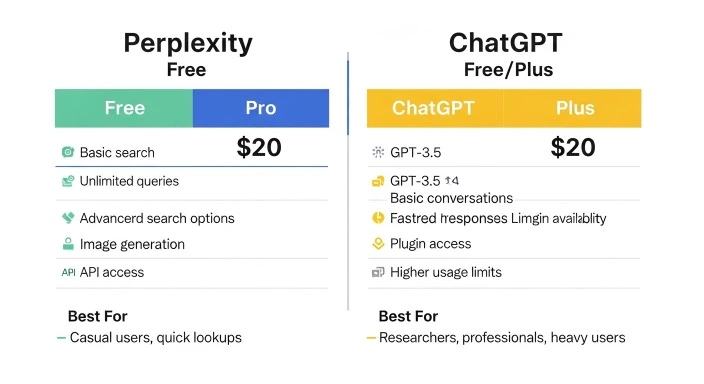
Both tools offer free and paid tiers. Let’s break down what you actually get.
Perplexity Pricing (February 2026)
Free Plan ($0/month)
- Unlimited basic searches
- Access to standard AI model
- Limited Pro searches (5 per day)
- Basic Copilot usage
- All Focus modes available
- Mobile and web access
Pro Plan ($20/month or $200/year) Over 300 Pro searches per day with a choice of premium AI models such as GPT-4, Claude 3, and similar
- Unlimited file uploads (PDFs, CSVs, images, audio, video)
- Priority support
- Advanced AI model selection
- API access
- Unlimited Copilot
- Collections with more storage
When Pro is worth it:
- You conduct research daily
- File analysis is critical to your work
- You need the most advanced AI models
- 5 Pro searches/day isn’t enough
When Free is sufficient:
- Casual research needs
- You use other tools primarily
- Budget is tight
- Basic searches meet your needs
ChatGPT Pricing (February 2026)
Free Plan ($0/month)
- Access to GPT-4o mini
- Limited GPT-5 access (with caps)
- Text-based conversations
- Basic file uploads
- Message limits during peak times
Plus Plan ($20/month)
- Unlimited GPT-5.2 access
- Advanced voice mode
- DALL-E image generation
- Code Interpreter
- Custom GPTs
- Early access to new features
- Priority access during peak times
Pro Plan ($200/month)
- Everything in Plus
- Advanced productivity features (ChatGPT Agent, Deep Research)
- Higher usage limits
- Faster response times
- For power users and professionals
When Plus is worth it:
- You use ChatGPT daily
- Image generation is valuable
- Code execution matters
- You create Custom GPTs
- Peak-time access is important
When Free is sufficient:
- Occasional use
- Basic queries only
- You’re experimenting
- Budget constraints
Direct Comparison: $20/Month Plans
| Feature | Perplexity Pro | ChatGPT Plus |
|---|---|---|
| Primary Strength | Research & current info | Analysis & creation |
| Search Capability | Real-time web search | Limited web browsing |
| AI Models | Multiple (GPT-4, Claude, etc.) | GPT-5.2 only |
| Citations | Every response | Limited |
| File Analysis | Unlimited uploads | Good support |
| Code Execution | No | Yes (Code Interpreter) |
| Image Generation | No | Yes (DALL-E) |
| Best For | Researchers, fact-checkers | Creators, developers |
My Recommendation
For most researchers: Start with both free plans to understand workflows. If you must choose one paid plan:
- Choose Perplexity Pro if: Current information and source verification are critical to your work (journalists, students, analysts)
- Choose ChatGPT Plus if: You need deep analysis, content creation, or coding assistance (developers, writers, strategists)
Ideal scenario: Use Perplexity Free + ChatGPT Plus, or invest in both Pro plans if research is your primary work.
Best Practices: Research Workflows with Perplexity and ChatGPT
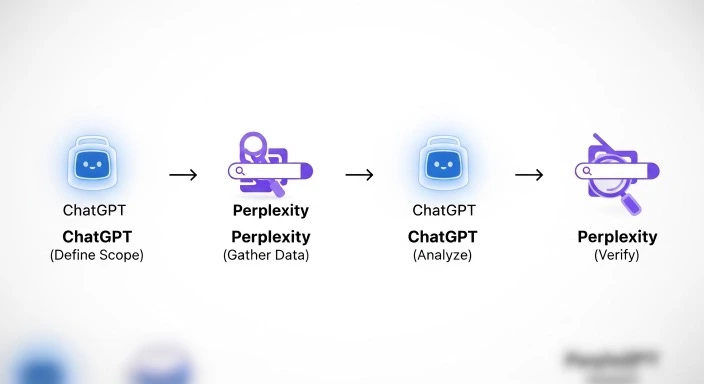
After testing both tools extensively, here are the most effective research workflows I’ve discovered.
Workflow 1: The Research Stack (Most Productive)
This is how I now approach any significant research project:
Step 1: Define scope with ChatGPT Start by asking ChatGPT to help you outline what you need to research.
Example: “I’m researching the impact of AI on healthcare. Help me create a research outline.”
ChatGPT will help you identify key questions, potential angles, and knowledge gaps.
Step 2: Gather current data with Perplexity Take each major question from your outline to Perplexity.
Example: “What are the most recent FDA approvals for AI diagnostic tools in healthcare?”
Perplexity finds current information with citations.
Step 3: Synthesize and analyze with ChatGPT Feed the information you gathered back to ChatGPT for deeper analysis.
Example: “Based on this research [paste Perplexity results], analyze the trajectory of AI regulation in healthcare.”
ChatGPT connects the dots and provides insights.
Step 4: Verify critical claims with Perplexity For any surprising or critical claims ChatGPT makes, double-check with Perplexity.
Example: “Is it true that the EU is implementing new AI healthcare regulations in 2026?”
Why this works: You get the best of both tools—current information, deep analysis, and fact-checking.
Workflow 2: The Academic Research Method
For students, researchers, and anyone doing scholarly work:
Step 1: Use Perplexity Academic Focus for literature review Search for recent studies in your field.
Example: “Recent peer-reviewed studies on CRISPR gene therapy published 2025-2026” [Academic Focus enabled]
Step 2: Use ChatGPT to understand complex papers Upload PDFs to ChatGPT (if you have Plus) or paste abstracts.
Example: “Explain the methodology of this study in simpler terms and identify its key contributions.”
Step 3: Use Perplexity to find related research Leverage Perplexity’s related questions to discover adjacent studies.
Step 4: Use ChatGPT to identify research gaps Ask ChatGPT to analyze what’s missing from current research.
Example: “Based on these 10 studies, what research questions remain unanswered?”
Step 5: Use Perplexity to verify current state Before finalizing, check if newer research has been published.
Workflow 3: The Journalist/Fact-Checker Method
For professionals who need verified, current information:
Step 1: Start with Perplexity for the facts Get the who, what, when, where with citations.
Example: “What happened in the Senate vote on [bill name] today?”
Step 2: Use ChatGPT for context and analysis Understand the broader implications.
Example: “Explain the historical context of this bill and what this vote means for future legislation.”
Step 3: Return to Perplexity for expert reactions Find current quotes and expert analysis.
Example: “What are policy experts saying about this vote?”
Step 4: Verify sources with Perplexity For any questionable claims, fact-check immediately.
Why this works: You maintain journalistic standards while leveraging AI efficiency.
Workflow 4: The Market Research Method
For business professionals, product managers, and entrepreneurs:
Step 1: Use Perplexity for current market data Gather recent statistics, competitor moves, and industry trends.
Example: “What are the current market leaders in project management software and their 2026 pricing?”
Step 2: Use ChatGPT to analyze competitive positioning Understand strategic implications and market dynamics.
Example: “Based on this pricing data, analyze the competitive strategy of each company and identify market gaps.”
Step 3: Use Perplexity to verify market claims Check any strategic assumptions against current reality.
Example: “Are remote work trends actually increasing demand for async collaboration tools in 2026?”
Step 4: Use ChatGPT for strategic recommendations Develop actionable insights and next steps.
Example: “Given this market analysis, what positioning strategy would you recommend for a new entrant?”
Why this works: Combines real-time market intelligence with strategic thinking.
Workflow 5: The Quick Fact-Check Method
For rapid verification of claims you encounter:
Step 1: Paste claim into Perplexity Let Perplexity search for current, authoritative sources.
Step 2: Review sources critically Check that Perplexity cited credible sources, not just any websites.
Step 3: If sources seem questionable, ask ChatGPT Use ChatGPT’s reasoning to evaluate the claim’s plausibility.
Example: “Does this claim make logical sense given what we know about [topic]?”
Step 4: For important decisions, verify manually Click through to actual sources—don’t rely solely on AI summaries.
Why this works: Fast verification with built-in quality checks.
Common Mistakes to Avoid When Using Perplexity for Research
After watching others use these tools and making mistakes myself, here are the pitfalls to avoid:
Mistake 1: Trusting Citations Without Clicking Through
The mistake: Assuming that because Perplexity cited a source, the information is definitely accurate.
Why it’s wrong: While Perplexity generally cites well, it can occasionally:
- Misinterpret source material
- Cite sources that don’t fully support its claims
- Pull from less credible sources when authoritative ones aren’t available
The fix: For critical information, click through to sources. Verify that:
- The source actually says what Perplexity claims
- The source is credible for this type of information
- The source is current (check publication date)
Mistake 2: Using Only Free Plan for Professional Research
The mistake: Relying on the 5 daily Pro searches when you need comprehensive research.
Why it’s wrong: Pro searches use more advanced models and deeper analysis. For professional work, the quality difference is significant.
The fix: If research is core to your work, invest in Pro ($20/month). The time saved and quality improvement justify the cost.
Mistake 3: Not Comparing Multiple AI Tools
The mistake: Using only Perplexity or only ChatGPT for all research needs.
Why it’s wrong: Many people use both ChatGPT and Perplexity because they complement each other. You might brainstorm ideas with ChatGPT, then turn to Perplexity for detailed research and reliable sources.
The fix: Develop workflows that use both tools strategically, as outlined in the workflow section above.
Mistake 4: Ignoring Focus Modes
The mistake: Using default “All” search when Academic or other Focus modes would be more appropriate.
Why it’s wrong: You get lower-quality sources mixed with high-quality ones, requiring manual filtering.
The fix:
- Academic research → Use Academic Focus
- Math/science calculations → Use Wolfram Focus
- User experiences → Try Reddit Focus
- Video tutorials → Try YouTube Focus
Mistake 5: Not Verifying Statistical Claims
The mistake: Accepting statistics and data points at face value.
Why it’s wrong: AI can occasionally cite outdated statistics, misinterpret data, or cherry-pick figures.
The fix: For any critical statistics:
- Click through to the source
- Verify the date of the data
- Check if context changes interpretation
- Cross-reference with other sources
Mistake 6: Forgetting About Knowledge Cutoff Issues
The mistake: Asking ChatGPT about current events as if it has real-time information.
Why it’s wrong: ChatGPT’s knowledge ends at its training cutoff (January 2025 for current models). It will sometimes try to answer anyway, leading to outdated or incorrect information.
The fix: For anything happening after January 2025, always use Perplexity. Use ChatGPT for analysis of information you provide.
Mistake 7: Over-Relying on AI Without Critical Thinking
The mistake: Treating AI outputs as gospel truth without applying your own judgment.
Why it’s wrong: Both tools can make errors, hallucinate, or miss nuance. Both tools can hallucinate or misinterpret. Perplexity usually provides more current, source-backed facts, while ChatGPT excels at plausible, engaging answers but may be slightly outdated.
The fix: Use AI as a research assistant, not a replacement for thinking:
- Question surprising claims
- Verify critical information
- Apply domain expertise
- Use multiple sources
- Think independently
Who Should Use Perplexity vs ChatGPT?
Let me make this practical with specific recommendations.
Use Perplexity as Your Primary Tool If You Are:
Students and Academics
- Writing research papers requiring recent citations
- Conducting literature reviews
- Fact-checking for assignments
- Finding peer-reviewed sources
- Staying current in your field
Journalists and Content Creators
- Fact-checking stories
- Finding current statistics and data
- Verifying claims
- Researching breaking news
- Gathering expert quotes and sources
Market Researchers and Analysts
- Tracking industry trends
- Monitoring competitors
- Finding current market data
- Analyzing recent developments
- Preparing data-driven reports
Legal and Compliance Professionals
- Researching current regulations
- Finding case precedents
- Verifying legal claims
- Staying updated on policy changes
- Gathering authoritative sources
Use ChatGPT as Your Primary Tool If You Are:
Developers and Engineers
- Writing and debugging code
- Learning new programming concepts
- Creating technical documentation
- Solving complex technical problems
- Building prototypes
Writers and Marketers
- Creating content from scratch
- Brainstorming ideas
- Drafting copy and articles
- Editing and refining writing
- Developing creative concepts
Strategists and Consultants
- Analyzing complex problems
- Developing frameworks
- Synthesizing information
- Creating strategic recommendations
- Building models and plans
Educators and Trainers
- Explaining complex concepts
- Creating learning materials
- Developing curriculum
- Answering student questions
- Building analogies and examples
Use Both Tools If You Are:
Product Managers
- Researching market with Perplexity
- Analyzing strategy with ChatGPT
- Gathering competitive intelligence
- Developing product roadmaps
Consultants
- Finding current data with Perplexity
- Developing insights with ChatGPT
- Verifying claims with Perplexity
- Creating deliverables with ChatGPT
Researchers (Any Field)
- Gathering sources with Perplexity
- Understanding concepts with ChatGPT
- Verifying facts with Perplexity
- Synthesizing findings with ChatGPT
Perplexity vs ChatGPT: The Final Verdict
After three weeks of intensive testing, here’s my honest assessment:
Perplexity Is Better Than ChatGPT for Research When:
✅ You need current information (anything after January 2025)
✅ Source verification is critical (academic, journalistic, legal work)
✅ Speed matters (fast answers to specific questions)
✅ You’re fact-checking (verifying claims quickly) ✅ You need multiple sources (comprehensive coverage of a topic)
ChatGPT Is Better Than Perplexity for Research When:
✅ You need deep analysis (understanding complex topics)
✅ You’re synthesizing information (connecting dots across sources)
✅ Historical context matters (understanding pre-2025 topics)
✅ You’re problem-solving (working through complex challenges)
✅ You’re creating content (generating from research)
The Truth: You Need Both
Most users don’t “pick one”—the productivity boost comes from using both together: Perplexity to gather information, ChatGPT to transform that information into something usable.
The real question isn’t “which is better?” but “how can I use both effectively?”
My recommended setup:
For Casual Users:
- Perplexity Free + ChatGPT Free
- Total cost: $0/month
- Use Perplexity for lookups, ChatGPT for explanations
For Professional Researchers:
- Perplexity Pro + ChatGPT Plus
- Total cost: $40/month
- Worth every penny if research is your work
For Budget-Conscious Professionals:
- Perplexity Free + ChatGPT Plus (or vice versa)
- Total cost: $20/month
- Choose based on your primary need
For Power Users:
- Perplexity Pro + ChatGPT Plus
- Total cost: $40/month
- Consider it essential infrastructure
FAQ
Q: Is Perplexity AI better than ChatGPT for academic research?
Yes, for finding recent academic sources. Perplexity’s Academic Focus feature lets you search only within academic research papers from databases like PubMed and arXiv, making it superior for literature reviews and finding peer-reviewed sources. However, ChatGPT is better for understanding complex academic concepts and explaining research methodologies. The ideal approach: use Perplexity to find papers, ChatGPT to understand them.
Q: Does Perplexity have access to real-time information that ChatGPT doesn’t?
Yes. Perplexity performs real-time web searches for every query, accessing current information from across the internet. ChatGPT’s knowledge is limited to its training data (cutoff January 2025 for current models). For anything happening after that date—news, recent research, current pricing, latest developments—Perplexity is the only option between the two. ChatGPT Plus does have a browsing feature, but it’s slower and less comprehensive than Perplexity’s core search functionality.
Q: Can I trust Perplexity’s citations and sources?
Mostly, but not blindly. Perplexity generally cites credible, authoritative sources and provides direct links for verification. However, you should always click through to sources for critical information. The AI can occasionally misinterpret source material or cite less authoritative sources when better ones aren’t available. For professional or academic work, treat Perplexity as a research assistant that finds sources quickly, not as the final authority. Always verify important claims independently.
Q: Is Perplexity Pro worth $20/month for students?
It depends on your research intensity. If you’re writing multiple research papers, conducting thesis research, or in graduate school, the investment pays off through time savings and access to better AI models. The unlimited file uploads alone are valuable for analyzing research papers. However, if you’re an undergraduate with occasional research needs, the free plan’s 5 Pro searches per day might suffice. Consider starting with free, then upgrading when you hit the limits during heavy research periods.
Q: Which is better for coding: Perplexity or ChatGPT?
ChatGPT is significantly better for coding. It can write code, execute it in a sandbox environment, debug errors, and iterate on solutions. Perplexity can find code examples and documentation but cannot execute or test code. For software development, ChatGPT Plus (with Code Interpreter) is the clear choice. Use Perplexity only to find current documentation or recent best practices, then implement with ChatGPT.
Q: Can I use both Perplexity and ChatGPT in the same research workflow?
Absolutely—this is the most effective approach. Use Perplexity to gather current data and sources, then use ChatGPT to analyze and synthesize that information. Many professionals have a workflow: Perplexity for “what’s happening” → ChatGPT for “what does it mean” → Perplexity again to verify ChatGPT’s analysis. This combination leverages each tool’s strengths while compensating for their weaknesses.
Q: Does Perplexity work better than ChatGPT for fact-checking?
Yes, Perplexity is superior for fact-checking because it provides source-backed answers with citations you can verify immediately. When you need to check if a claim is true, Perplexity searches current sources and shows you exactly where information comes from. ChatGPT can reason about whether claims are plausible but cannot access current information to verify recent claims. For any fact-checking work—journalism, research, or debunking misinformation—Perplexity should be your first tool.
Q: What are the main limitations of Perplexity compared to ChatGPT?
Perplexity’s main limitations are: (1) No code execution capability, (2) No image generation, (3) Less sophisticated reasoning for complex analytical tasks, (4) Shorter, less conversational responses, and (5) Cannot maintain as deep contextual understanding across long conversations. Perplexity excels at finding and summarizing information but is weaker at creative tasks, deep analysis, and multi-step problem-solving where ChatGPT shines.
The Takeaway: Making the Right Choice for Your Research Needs
After extensive testing of both Perplexity AI and ChatGPT for research purposes, the answer to “which is better” isn’t straightforward—because they’re fundamentally different tools built for different purposes.
Perplexity AI excels as a research engine—think of it as Google search powered by AI, with the crucial addition of synthesis and citation. When you need current information, verified sources, or fast answers to specific questions, Perplexity delivers. Its Academic Focus mode, real-time web search, and citation-first approach make it invaluable for anyone who needs verifiable, up-to-date information.
ChatGPT excels as an analytical partner—think of it as a knowledgeable colleague who can explain complex topics, synthesize information, and help you think through problems. When you need deep understanding, creative ideation, or complex problem-solving, ChatGPT’s reasoning capabilities outshine Perplexity.
The most productive approach isn’t choosing one over the other—it’s understanding when to use each tool and, ideally, using them together. Start with Perplexity to gather current information and sources, then use ChatGPT to analyze and synthesize those findings into actionable insights.
If you can only choose one:
- Choose Perplexity if your work depends on current information and source verification (students, journalists, researchers, analysts)
- Choose ChatGPT if you need analytical depth, content creation, or coding assistance (developers, writers, strategists)
If you can invest in both: The $40/month for Perplexity Pro + ChatGPT Plus is the most powerful research setup available in 2026. For anyone whose work depends on information and analysis, this investment pays for itself in time saved and quality improved.
For more guidance on maximizing your AI research workflow, check out our guides on AI productivity tools, ChatGPT vs Claude for research tasks, and organizing research with AI.
What’s your experience with Perplexity and ChatGPT for research? Which tool has worked better for your specific needs? Share your insights in the comments below—I’d love to hear how other researchers are using these tools!
Our Authority Sources
OpenAI Official Documentation The authoritative source for ChatGPT capabilities, features, API documentation, and model specifications. Provides technical details on GPT-5.2, GPT-4o, and ChatGPT’s evolving features including Code Interpreter, browsing, and Custom GPTs. Essential for understanding ChatGPT’s actual capabilities versus marketing claims.
Perplexity AI Official Resources Primary source for Perplexity’s features, Focus modes, search capabilities, and Pro plan specifications. Documents the AI models Perplexity uses, its real-time search architecture, and citation methodology. Critical for accurate information about Perplexity’s current capabilities as of February 2026.
Nexos AI Comparative Analysis Independent technology research firm providing detailed head-to-head testing of AI tools across coding, research, content creation, and enterprise applications. Their 2026 comparison includes empirical test results measuring response times, accuracy, and use-case performance between Perplexity and ChatGPT.
Cybernews AI Tools Research Technology publication specializing in AI tool reviews and comparisons. Their testing methodology includes real-world use cases, pricing analysis, and feature-by-feature comparisons. Provides consumer-focused perspective on AI tool selection and practical application scenarios.
Moin.ai AI Research Documentation European AI research platform focusing on conversational AI and chatbot technology. Offers detailed technical analysis of LLM architectures, search methodologies, and AI model selection. Particularly valuable for understanding how Perplexity’s multi-model approach compares to ChatGPT’s single-provider model.