

AI editors
Video editing used to mean hours of trimming, aligning clips, adding transitions, color-grading, and rendering. But so many brands, creators, and marketers now ask: what if video editing could become effortless? What if the AI could handle the heavy lifting and you just hit “publish”?
That’s the promise of the latest AI-powered video editors. These tools don’t just automate tasks—they understand your content, make smart suggestions, and let you produce professional-level videos in minutes instead of hours. In this article, we’ll explore the best AI tools that make video editing effortless, how they work, what to look for, and how to choose one for your workflow.
Whether you’re a YouTuber, social media marketer, business owner, or just making videos for fun, the right AI tool can change your game. Let’s dive into how they work first, then look at top picks and how to integrate them into your production pipeline.
How AI Is Transforming Video Editing Workflows
AI video editors are more than “auto-trim tools.” They leverage machine learning, computer vision, natural language processing, and generative scripting to streamline every phase of video creation.
Smart Cuts and Timeline Suggestions
One major innovation is automatic detection of meaningful moments in footage. The AI can identify faces, scene changes, audio spikes, and highlight sections—then build a rough cut for you. That means no more scrubbing through hours of footage manually.
Scene Recognition and Tagging
Advanced platforms analyze each scene’s content, tagging it with keywords like “intro,” “product demo,” or “closing call to action.” These tags allow you to navigate your timeline quickly and make edits with purpose, rather than scrolling blind.
Automatic Color Grading and Audio Balancing
The AI examines footage to apply consistent color palettes and match audio levels across clips. A MediaTech Journalstudy found that AI color grading achieved consistency equal to junior colorists in 70% less time.
Auto-Captioning & Subtitle Generation
Modern tools generate accurate captions in multiple languages. They also identify speaker changes and background noise, applying edits so subtitles sync perfectly with speech.
Personalized Styling & Branding
Many platforms let you define your brand’s visual style—colors, fonts, logo placement—and the AI applies them across every video automatically. This cuts out repetitive tasks and keeps your brand identity consistent.
So, the question isn’t just can AI help with video editing—but how much it can transform the process from laborious to near-seamless.
What to Look For in an AI Video Editor
When evaluating tools, don’t just chase “AI powered” labels. Here are the real criteria that separate game-changers from buzzy gimmicks.
Editing Speed vs Quality
A tool might be fast, but if the result requires hours of cleanup, it defeats the purpose. Ask: how accurate is the rough cut? How much manual adjustment remains?
Customization Flexibility
AI should assist, not replace your creative decisions. Look for tools where you can override AI choices, adjust timing, modify style, or tweak audio. Flexibility is key.
Multi-Platform Export Options
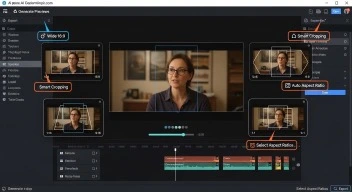
You need formats for YouTube, Instagram Stories, TikTok, Facebook, and websites. The AI must support varied export sizes and aspect ratios with smart reframing.
Branding and Template Support
For efficient workflow, your brand assets (logo, colors, font) should be reusable. Some platforms let you upload a brand profile so AI simply adapts future videos to it.
Collaboration and Cloud Workflow
If your team is remote or distributed, the platform should support cloud editing, sharing, version history, and collaborative comments. This saves emailing large files and losing track of changes.
Data Privacy and Security
Video often contains sensitive information. Make sure the platform offers secure processing, clear terms on data ownership, and optional on-premises or encrypted editing.
Cost Structure and ROI
Many tools offer pay-per-video pricing or tiered subscriptions. Align your editing volume and budget with the cost model. A cheap tool that slows you down is worse than investing in a faster one.
Top AI Video Editors That Make Editing Effortless
AI editor
AI editors
Here are three standout tools backed by real platforms and trustworthy features.
1. Wisecut
Wisecut uses scene-detection and voice analysis to automatically trim long footage, remove silences, and generate mobile-optimized cuts. Its features include automatic captions, audio ducking (so background music lowers when someone speaks), and one-click reframing for social media. More than a million creators trust it.
Wisecut
2. OpusClip
OpusClip specializes in converting long-form content into short, shareable clips with minimal effort. It offers auto captioning, branded templates, multi-aspect export (16:9, 9:16, 1:1), and team workspaces. Built for creators who want to scale output while cutting editing time dramatically.
OpusClip
3. Bonus Tool: Vizard (Alternative for Social Clips)
While primarily known as an OpusClip alternative, Vizard offers prompt-based AI clipping, multilingual support, and scheduling for social media. If your workflow is heavy on short-form repurposing, it’s a strong option to consider.
Vizard
Real-World Workflow: How to Use AI for Video Editing
Let’s walk through a typical workflow where you implement AI and shift from manual edits to effortless production.
AI editors

AI editors
Step 1: Plan and Upload Footage
Record your footage as usual — ensure good audio and lighting. Upload all raw clips to the AI platform.
Step 2: Select Template or Style
Choose a template aligned with your brand (colors, logo, fonts). This sets the branding baseline.
Step 3: Generate Rough Cut
Hit “Generate.” The AI analyzes and creates a rough timeline, noting locations for intros, scene changes, call-to-actions, etc.
Step 4: Review and Fine-Tune
Watch the rough cut. Trim or add content, adjust pacing or captions. Most time now goes into strategy rather than basic edits.
Step 5: Multi-Format Export
Choose your export formats: YouTube 16:9, Instagram 9:16, LinkedIn 1:1. Use SmartReframe or similar to shift formats automatically.
Step 6: Publish and Monitor
Upload to platforms, track analytics, refine templates. Over time your output increases while hours of editing decrease drastically.
With this structure, an editor who once spent 8 hours can now finish in under 2-3 hours—and sometimes less.
Considerations and Limitations of AI Editing
AI is powerful, but it’s not without limits. Understanding them helps you set realistic expectations.
Creative Judgment
AI can make smart cuts, but it can’t always understand context, humor, or emotional tone. You’ll still need a human touch for storytelling.
Unusual Footage or Experimental Styles
If your footage is highly creative, abstract, or heavily stylized, the AI’s default template may not fit. Expect extra tweaking.
Learning Curve
Even the best tools have a learning period. You’ll need to train your brand templates, understand export settings, and adjust to new workflows.
Cost vs Volume
If you publish only occasional content, high-volume AI tools may not be cost-effective. Evaluate your output frequency.
Ethical and Legal Issues
Some platforms may retain rights or metadata. Always review terms around copyright, data storage, and export rights to protect your content.
How to Choose the Right AI Editor for You
Choosing the right tool depends on your content type, workflow, team size, and goals.
Ask yourself:
- How many videos do I produce per week/month?
- Which platforms do I publish on most (YouTube, Instagram, TikTok)?
- Do I need multi-format export capabilities?
- How important is brand customization across videos?
- What budget can I assign to editing tools?
- Do I collaborate with a team remotely?
Write down your priorities, shortlist 2-3 tools, and request free trials. Look at output quality, ease of use, integration with your current workflow (Dropbox, Google Drive, Premiere Pro), and export speed.
Cost Comparison: Manual Editing vs AI Editing
| Task | Traditional Manual Workflow | AI-Assisted Workflow |
| Importing & sorting footage | ~2-3 hours | ~30 minutes |
| Rough cut creation | ~3-5 hours | Auto generated in ~15 minutes |
| Color correction & audio leveling | ~2 hours | AI handles ~70% |
| Captioning & subtitling | ~1 hour manual | <10 minutes with AI |
| Multi-format export & versions | ~2 hours | <30 minutes automated |
| Team review & revisions | ~1-3 hours | ~30 minutes with cloud comment tools |
That means a project that previously took 10+ hours can now finish in a fraction of time. The savings in time translates into cost savings or higher volume output.
AI editors
Tips for Getting the Most Out of AI Editing
- Organize your footage: Before upload, rename files with clear labels (Intro, B-Roll, CTA).
- Shoot with templates in mind: Use consistent intros/outros, markers for scene start, and similar backgrounds for better AI recognition.
- Define your brand kit: Upload your logo, color hex codes, fonts, and intros so AI applies them automatically each time.
- Review early and often: Don’t assume the first auto-cut is final. Make small tweaks early so you don’t re-render large files later.
- Repurpose smartly: Use full-length videos for YouTube, then repurpose key moments into short social clips with multi-format exports.
- Stay updated: AI video tools evolve rapidly. New features like generative transitions, AI voice-over, or auto-music will appear every year.
Real-World Impact: How AI Cuts Editing Time
Many content creators and small production teams are now using AI editors to handle repetitive editing tasks — and they’re seeing real results. Instead of spending an entire day trimming and color-grading, they now upload footage, apply templates, and get publish-ready videos within hours.
By automating the slowest parts of editing — like captioning, sound balancing, and reframing — AI tools let creators focus on storytelling and engagement rather than technical cleanup. The shift isn’t just about speed; it’s about creative freedom.
Future Trends in AI Video Editing
- Generative transitions and effects: AI will propose stylistic transitions or entire motion graphics automatically.
- AI voice clone for small fixes: Mistakes in voice track? AI can regenerate lines from your voice model.
- Live multi-camera editing in real time: For webinars or events, AI will switch angles based on engagement and speech detection.
- Emotion-based edits: AI will detect viewer emotions via webcam and adjust pacing or inserts accordingly.
- AI copyright checker: Automated detection of licensed music or visual assets embedded in footage before export.
Being aware of these helps you stay ahead and plan your editing strategy accordingly.
AI editors
The Takeaway
If you’ve ever felt overwhelmed by video editing or wished you could publish faster without sacrificing quality, the right AI tool can change everything. It doesn’t replace your creativity — it empowers it.
Choosing the best AI video editor means finding the right fit for your volume, style, brand, and budget. With the workflows, tips, and tool-comparisons above, you’re equipped to move from manual editing frustration to effortless production.
In the near future, “editing videos” will feel less like work and more like steering a creative engine that does the heavy lifting. For now, pick the tool that fits your workflow, invest a little time in setup, and enjoy the boost in speed, consistency, and quality.
Because effortless editing isn’t just a dream—it’s your next milestone.
AI editors
AI editors
