
Freelancing is freedom.
It’s also juggling a dozen tasks at once.
You’re pitching clients, managing projects, sending invoices, creating content, answering emails, and trying to stay focused without burning out. That’s where the best AI for freelancers comes in — not to replace your work, but to give you your time back.
The right tools can shave hours off your week, reduce mental fatigue, and help you deliver better results without working longer days.
Below are 15 AI tools freelancers actually use to work faster, stay organized, and scale without stress.
Why Freelancers Are Turning to AI Tools
AI isn’t about shortcuts.
It’s about leverage.
Freelancers use AI to:
- Speed up repetitive tasks
- Stay focused during deep work
- Reduce admin overload
- Improve quality without extra effort
- Handle more clients without burnout
When chosen carefully, AI becomes a quiet assistant that works in the background — saving time while you stay in control.
The Best AI for Freelancers (15 Time-Saving Tools)
1. Notion — All-in-One Workspace
Best for: Organization, planning, client management
Notion acts like your second brain.
Freelancers use it to track projects, deadlines, content calendars, and even finances — all in one place.
Its AI features help summarize notes, generate outlines, and turn messy ideas into structured plans.
Why freelancers love it:
You stop juggling apps and start seeing everything clearly.
Source: https://www.notion.so
2. Grammarly — Writing Without Second-Guessing
Best for: Writers, emails, proposals
Grammarly catches grammar issues, improves clarity, and adjusts tone before clients ever see your work.
It’s especially helpful for freelancers writing fast under pressure.
Time saved: Editing and rewrites.
Source: https://www.grammarly.com
3. Trello — Simple Visual Task Management
Best for: Project tracking
Trello keeps projects visual and easy to manage.
With AI-powered automations, cards move themselves and reminders fire automatically.
Why it works:
Less mental load. More momentum.
Source: https://trello.com
4. ClickUp — Built for Scaling Freelancers
Best for: Managing multiple clients
ClickUp combines tasks, docs, goals, and time tracking in one system. Its AI tools help summarize updates and create action steps instantly.
Perfect when your freelance workload starts growing fast.
Source: https://clickup.com
5. Otter.ai — Meeting Notes Without Typing

Best for: Coaches, consultants
Otter.ai records and transcribes meetings automatically. You stay present, and notes are ready when the call ends.
Hidden benefit: No more re-listening to recordings.
Source: https://otter.ai
6. Canva — Design Without Design Skills
Best for: Social posts, client visuals
Canva’s AI tools generate layouts, resize designs instantly, and speed up content creation.
You don’t need Photoshop to look professional.
Source: https://www.canva.com
Read also AI tools for freelancers
7. Clockify — Know Where Your Time Goes
Best for: Billing and productivity
Clockify tracks work automatically so you can bill accurately and identify time leaks.
Freelancer bonus: Proof for clients who ask where hours went.
Source: https://clockify.me
8. Fireflies.ai — Smart Call Summaries
Best for: Sales calls, discovery calls
Fireflies records meetings and generates summaries, action items, and highlights.
Perfect for freelancers who do frequent client calls.
Source: https://fireflies.ai
9. Jasper — Content at Scale
Best for: Copywriters, marketers
Jasper helps brainstorm ideas, outlines, and drafts — especially for blogs, ads, and landing pages.
Used properly, it speeds up ideation without killing your voice.
Source: https://www.jasper.ai
10. Zapier — Automate the Boring Stuff
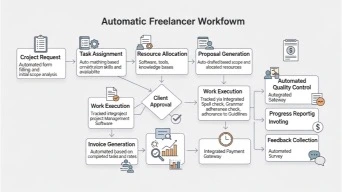
Best for: Workflow automation
Zapier connects your apps and runs tasks automatically. New client form? Auto-create tasks, folders, and emails.
Result: Less clicking. More creating.
Source: https://zapier.com
11. RescueTime — Focus Without Guessing
Best for: Beating distractions
RescueTime shows where your attention actually goes and helps you build better work habits.
It’s eye-opening — in a good way.
Source: https://www.rescuetime.com
12. Motion — Smart Daily Planning
Best for: Time-blocked freelancers
Motion automatically schedules tasks based on deadlines and priorities.
If you struggle with daily planning, this tool is a game-changer.
Source: https://www.usemotion.com
13. Descript — Edit Media Like Text
Best for: Podcasters, video creators
Descript lets you edit audio and video by editing text. Remove filler words, fix mistakes, done.
No timeline headaches.
Source: https://www.descript.com
14. ChatPDF — Understand Long Docs Fast
Best for: Contracts, reports
Upload a document and ask questions. ChatPDF pulls answers instantly.
A lifesaver when reviewing client contracts.
Source: https://www.chatpdf.com
15. Scribe — Create SOPs Automatically
Best for: Systemizing your work
Scribe records your workflow and turns it into step-by-step guides automatically.
Perfect for outsourcing later.
Source: https://scribehow.com
How to Choose the Best AI for Freelancers
Don’t download everything.
Ask yourself:
- What tasks drain the most time?
- Where do mistakes happen often?
- Which process feels repetitive?
Start with one or two tools, master them, then expand.
Common Questions About AI Tools for Freelancers (FAQ)
Q1: Is AI worth it for freelancers?
Yes — if it saves time, reduces stress, or improves output quality.
Q2: Will AI replace freelance work?
No. Clients still pay for judgment, creativity, and experience.
Q3: How much should freelancers spend on AI tools?
Only what directly saves hours or increases income.
Q4: Can beginners use these tools?
Absolutely. Most tools are built for non-technical users.
The Bottom Line

The best AI for freelancers doesn’t make you lazy.
It makes you focused.
When used intentionally, AI gives you:
- More time
- Better output
- Less burnout
- More room to grow
Start small. Stay human. Let tools handle the busywork.